


 Advanced DNS Security
 Cortex
 Unit 42 Incident Response


Executive Summary
Unit 42 researchers have observed evidence of cyberattacks by the Iran-nexus advanced persistent threat (APT) group Screening Serpens (aka UNC1549, Smoke Sandstorm and Iranian Dream Job). Based on our visibility, we believe that the group targeted entities in the U.S., Israel and the United Arab Emirates, and likely two additional Middle Eastern entities.
This research follows an evolution through cyberattacks in mid-February through April 2026. The timing of these campaigns aligns closely with that of the regional conflict that started in the Middle East on Feb. 28, 2026. We discovered six new remote access Trojan (RAT) variants developed and deployed between February and April 2026.
Screening Serpens has been active since at least 2022. Their recent activity demonstrates an increase in technical capabilities and operational resilience.
Screening Serpens primarily targets technology sector professionals, using highly tailored social engineering. The group frequently uses personalized recruitment lures that impersonate trusted brands and hiring platforms, to trick targets into initiating the infection chain.
We assess with moderate-high confidence that the campaigns discussed in this article are conducted by Screening Serpens. The group has maintained a consistently high operational tempo throughout March and April 2026.
We have grouped the six newly discovered RAT variants into two new malware families that were deployed in concurrent espionage campaigns. Based on the timing of deployment, our analysis indicates two sets of coordinated cyberattacks. At least one variant was compiled and deployed with specific timing instructions.
Our analysis reveals a continuous cycle of development and deployment, characterized by specialized and upgraded variants with diverse functionalities, as shown in each targeted campaign.
The most critical evolution in the group’s recent campaign uses a technique called AppDomainManager hijacking. This hijack method manipulates the initialization phase of .NET applications to proactively disable the application’s own security mechanisms via a legitimate configuration file. The disabled security in these apps left the targeted entities vulnerable to the deployed multi-functional RATs.
Palo Alto Networks customers are better protected from the threats described in this article through the following products and services:
- Advanced WildFire
- Advanced URL Filtering and Advanced DNS Security
- Cortex XDR and XSIAM
- Cortex Cloud
Cortex AgentiX Agentic Assistant can assist teams in investigating incidents.
If you think you might have been compromised or have an urgent matter, contact the Unit 42 Incident Response team.
| Related Unit 42 Topics | Advanced Persistent Threat (APT), Malware, Cyberespionage, RATs |
Screening Serpens Overview
Screening Serpens is an Iran-nexus APT group operating as a cyberespionage group aligned with Iranian intelligence objectives. While historically focused on regional targets in the Middle East, the group gained industry attention in late 2025 when Check Point Research detailed its strategic expansion into Western Europe.
During these campaigns, Screening Serpens consistently set its sights on high-value sectors, heavily targeting aerospace, defense manufacturing and telecommunications organizations. These operations are characterized by targeted social engineering campaigns, using lures designed specifically to trick job seekers in these key sectors.
Between February and April 2026, we identified six new remote access Trojan (RAT) variants that Screening Serpens deployed during the recent regional conflict. Based on VirusTotal metadata, it appears these samples may have been used against targets across the U.S., Israel and the UAE as well as two additional Middle Eastern entities. The samples are split into two distinct malware families:
- A newly discovered malware family that we call MiniUpdate
- An evolved iteration of a malware family named MiniJunk that we track as MiniJunk V2
Both families build directly upon the actor's established playbook. Their infection chains begin with targeted spear phishing lures, leveraging DLL sideloading for execution. The threat actor routes command and control (C2) traffic through a set of three to five unique domains, mostly hosted by Azure, dedicated to each target and variant. This technique prevents cross contamination to increase operational resiliency.
Timeline of Recent Cyber Activity
Here is the timeline of events in the recent Screening Serpens campaign:
- In late 2025, Screening Serpens expanded to targets in Western Europe.
- In mid-February, 2026, we found an indication of a payload delivery to a Middle Eastern target.
- In late March 2026, we identified samples uploaded to VirusTotal from organizations in the U.S. and Israel.
- Additional samples from the UAE and another Middle Eastern entity were discovered in mid-April 2026.
Figure 1 shows the transition from campaign preparation to a surge in coordinated attacks following the onset of the regional conflict.
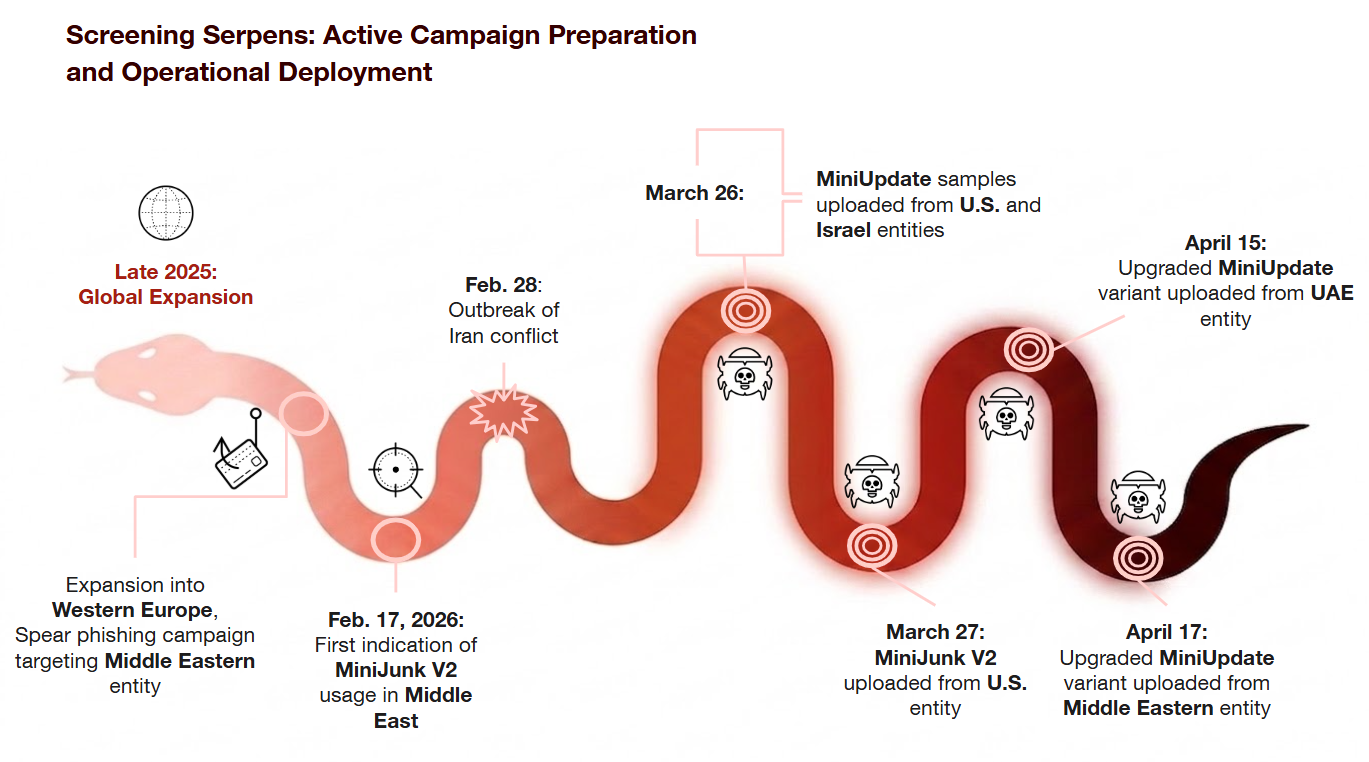
As seen in Figure 1, we observed the MiniUpdate family samples uploaded on March 26, April 15 and April 17. We observed the MiniJunk V2 family samples uploaded on Feb. 17 and in an upload on March 27.
We discuss the MiniUpdate family first in our analysis, and then cover the details of MiniJunk V2.
MiniUpdate RAT Analysis
After reading Check Point's initial report, we pivoted off the specific file name (Hiring Portal.zip) of another known Screening Serpens artifact. In doing so, we uncovered four samples that attackers deployed in two sets of coordinated attacks during the recent conflict. VirusTotal metadata indicates that the campaigns may have targeted entities in the U.S. and Israel on March 26, 2026, and most recently, the UAE and another Middle Eastern entity on April 15 and 17, 2026, respectively.
We named this malware family MiniUpdate, referencing the internal file name that we observed within these payloads: UpdateChecker.dll.
By comparing the two sets of coordinated attacks, we observed continued refinement of the malware’s abilities over the course of a month. The differences we identified between the samples were superficial changes to things like opcode mappings and specific functionalities, such as the latest variant’s ability to exfiltrate files in chunks. The most significant difference between the malware variants is the rotation of their C2 domains. While we observed these active adjustments, we did not observe a significant evolution in the malware itself.
MiniUpdate: March U.S. Campaign
Attackers delivered this variant via an archive file, as part of a campaign impersonating a global air carrier. Deployment of this malware began no earlier than March 26, 2026.
Initial Delivery and Targeted Recruitment Lures
An analysis of the archive's contents reveals a tailored social engineering trap aimed specifically at technical personnel. The ZIP contains a nested payload archive (Hiring Portal.zip) packaged alongside six PDF documents.
These PDFs are crafted job requisitions targeting high-level IT and engineering roles (e.g., Senior Software Engineer Job ID JR205894.pdf). Attackers mimicked legitimate corporate job applications by including specific job IDs, increasing the likelihood that the target will review the descriptions and extract the nested Hiring Portal.zip.
Targets likely believed they were accessing an application portal or a technical assessment. We did not find any indication in this campaign of a breach into the global air carrier’s infrastructure. The impersonation was limited to using its name and branding.
Figure 2 shows all the falsified job documents and the Hiring Portal.zip archive.
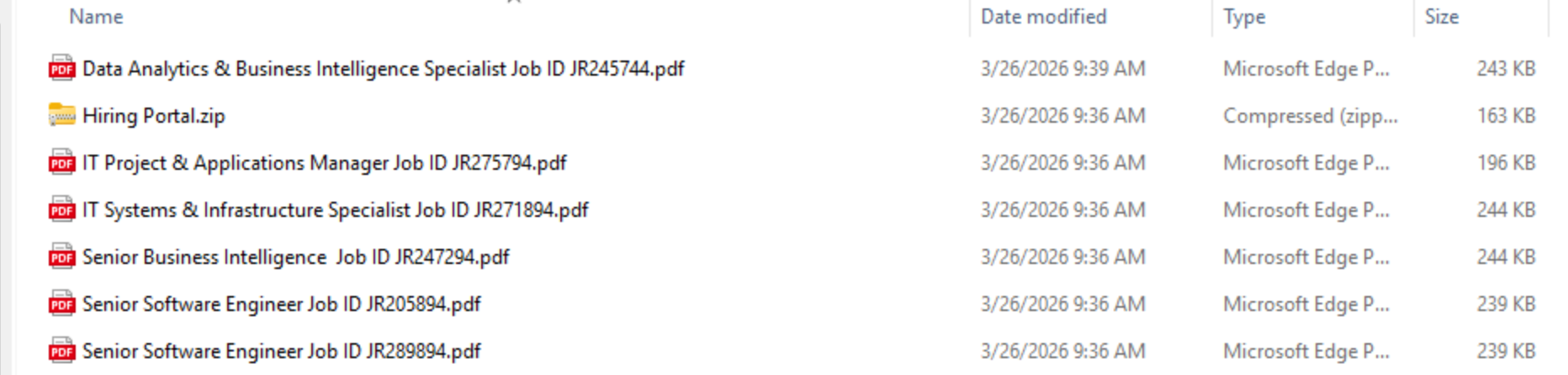
Figure 3 shows one of the Senior Software Engineer Job ID JR205894.pdf files from this archive, which contains detailed job requirements.
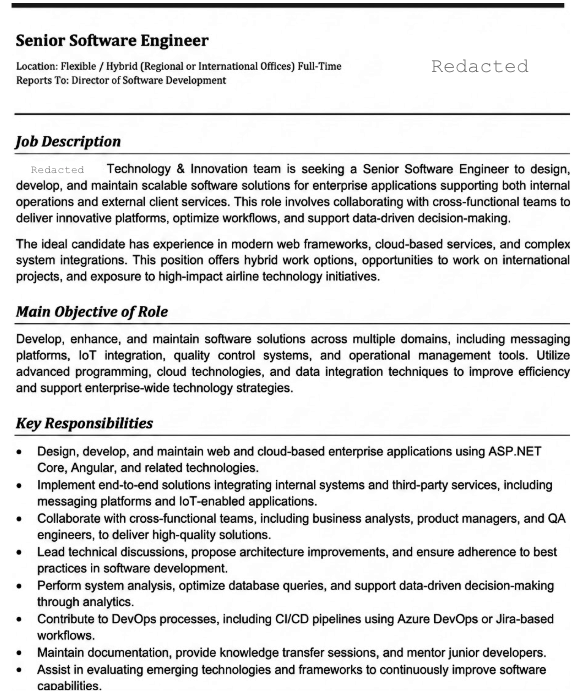
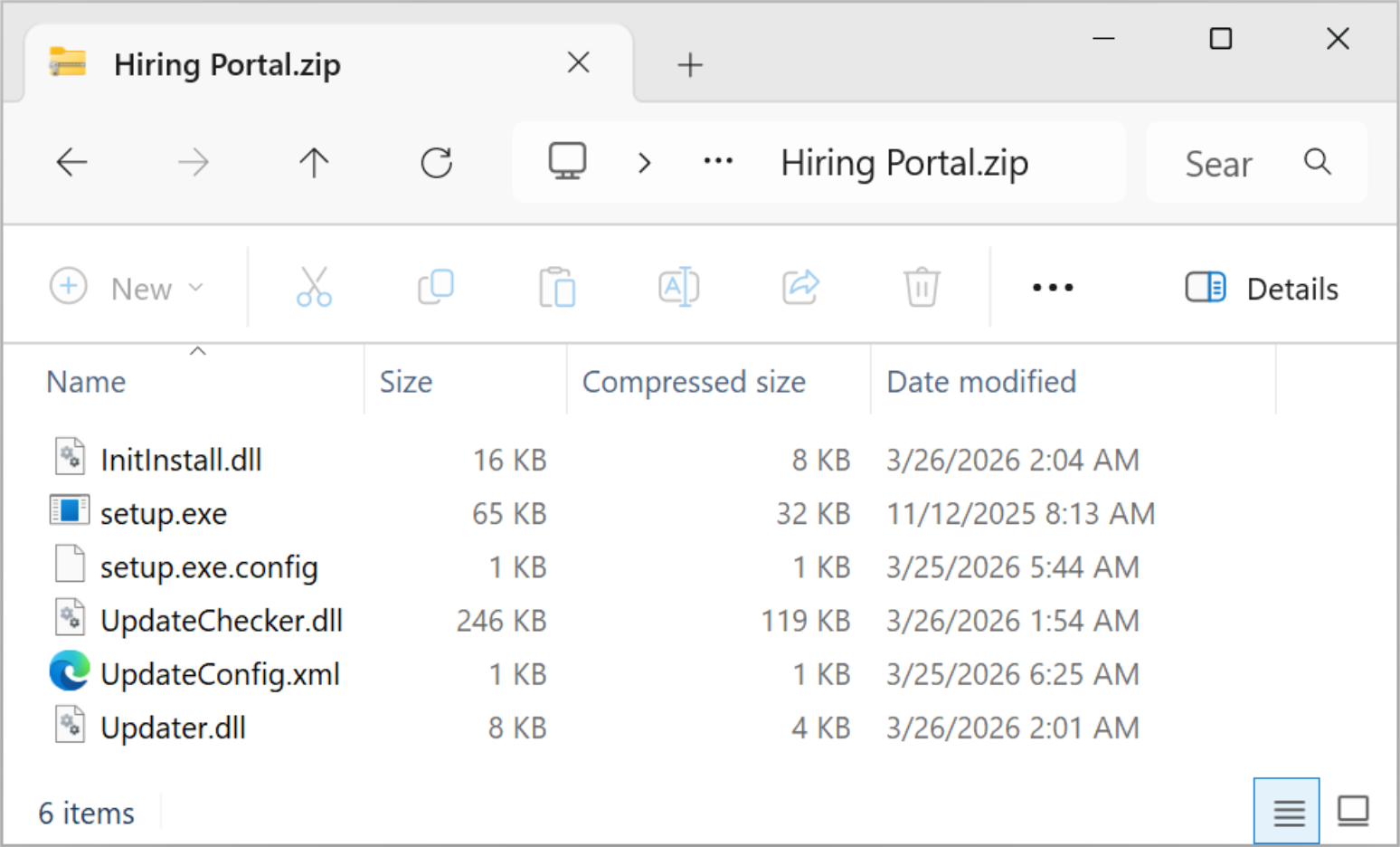
Figure 4 shows the contents of the Hiring Portal.zip archive contained in the initial archive file.
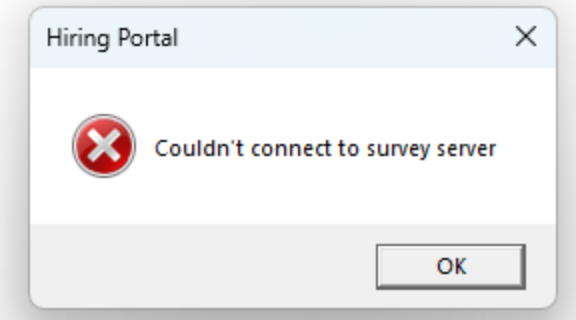
Upon executing setup.exe, the malware triggers a spoofed error window titled Hiring Portal.zip to establish legitimacy with the target, as Figure 5 shows.
MiniUpdate: March Israel Campaign
This variant was delivered via an archive file, to impersonate an install file for a popular video conferencing platform. Our analysis reveals that this variant was recently deployed, no earlier than March 26, 2026, ostensibly against an Israeli entity.
Social Engineering and Initial Access
Analysis of sequential artifact uploads to VirusTotal from March 2026 provides a view into Screening Serpens’ social engineering tactics. The threat actor actively engaged with the target to deliver convincing lures. By correlating the timeline of these uploads, we can map the sequence of the attack:
- Establishing trust: The target received a number of authentic video conferencing links, possibly to build trust during the phishing campaign.
- Initial lure: Capitalizing on the precedent of legitimate links, the attacker delivered a lookalike domain to attempt to compromise the target: hxxps[:]//[redacted][.]live/meeting/edcdba624ddb43c2a1dcf334aa493068
Looking into the response reveals a phishing landing page designed to mimic an authentic meeting invitation. It uses the brand’s familiar styling and contains a "join from workplace app" button. The goal of this cloned frontend design is to trick a target into believing they need to install or update their client software to enter a scheduled meeting.
However, the page contains a payload, hidden within JavaScript code, which redirects the victim’s download request away from the legitimate servers. If the victim interacts with the page, a payload delivery is triggered from a third-party file-sharing service via the following URL: hxxps[:]//2117.filemail[.]com/api/file/get?filekey=T0EnWQ6NugHkW_kLfDxPBEw_um6NSkg9ZwNRQ_5lrKrLLUo35pV8m3TKv1LqF3zZzdUm
- Payload delivery: The targeted lure tricked the victim into downloading the malicious archive from the impersonating website. This file served as the delivery archive for a malicious sideloading chain.
There is no indication that the attackers compromised or breached the impersonated organization’s infrastructure or systems. Their brand was only used in the context of impersonation to compel the victim to manually execute the malicious payload.
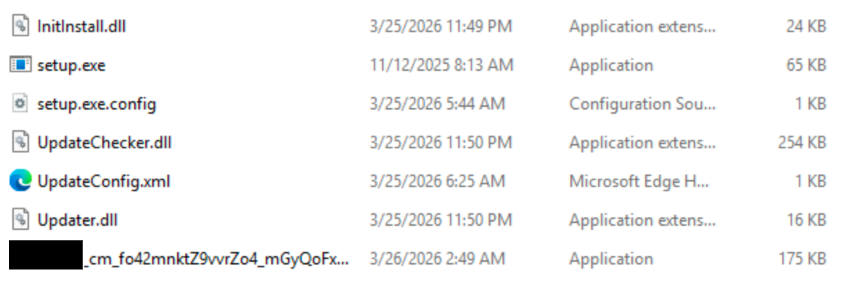
Figure 6 shows the contents of that archive. The first six files are part of the execution chain, while the last file is a genuine installer for the video conferencing application.
MiniUpdate: Mid-April Middle Eastern Campaigns
In the attacks that may have targeted entities in the UAE and potentially another Middle Eastern country, we identified two new MiniUpdate variants, compiled and submitted to VirusTotal between April 15 and April 17, 2026. While the initial loading mechanism remains consistent with previous variants, leveraging the same impersonation decoy, this version introduces a few upgrades to its infrastructure and core capabilities.
In the variant that may have targeted an entity in the UAE on April 15, 2026, the threat actor rotated the C2 domains to impersonate a health sector entity, using:
- PremierHealthAdvisory[.]com
- PremierHealthAdvisory.azurewebsites[.]net
- Premier-HealthAdvisory.azurewebsites[.]net
In the variant that may have targeted another Middle Eastern entity on April 17, 2026, the threat actor rotated the C2 domains to impersonate a financial sector entity, using:
- Ramiltonsfinance[.]com
- Ramiltonsfinance.azurewebsites[.]net
- Ramiltons-finance.azurewebsites[.]net
Furthermore, the April variants feature an expanded command dispatcher with 18 distinct opcodes, two more than the earlier March campaigns. This increase is valuable to the attackers because it expands their toolkit for stealing data. The primary new command allows the malware to break large files into smaller chunks during upload, providing a stealthier and more reliable way to exfiltrate data from compromised environments.
MiniUpdate Loading Flow
Advanced AppDomainManager Hijacking: Native EDR Evasion
The threat actor employed a .NET-specific code execution technique known as AppDomainManager hijacking. This method allows the attackers to hijack the execution flow of a legitimate application by manipulating its configuration file, granting them arbitrary code execution before the host application even starts. Consequently, the malware can preemptively disable logging mechanisms and other core features that endpoint security tools rely on to detect and block malicious activity.
At its core, this configuration relies on the <probing privatePath="."/> tag to force the local sideloading of an attacker-controlled assembly. It then instantiates a custom AppDomainManager type (such as MyAppDomainManager) to achieve this Pre-Main() execution.
However, the true sophistication of this variant lies in its native defense evasion directives. By adding just a few specific lines of XML, the threat actor instructs the .NET common language runtime (CLR) to proactively disable its own security mechanisms:
- Silencing event tracing for Windows: The configuration includes the directive <etwEnable enabled="false"/>. Event Tracing for Windows (ETW) is the primary telemetry source used by modern endpoint detection and response (EDR) solutions to monitor .NET execution, track loaded assemblies and detect malicious behaviors in memory. By disabling ETW natively via the application configuration, the attacker potentially shrouds the EDR to the CLR's runtime behavior without needing to perform suspicious memory patching or API hooking.
- Bypassing signature validation: The <bypassTrustedAppStrongNames enabled="true"/> directive instructs the CLR to skip strong-name signature validation. This ensures that even if the system normally requires cryptographic verification for loaded assemblies, the attacker's unsigned or tampered InitInstall.dll will load silently without throwing a security exception.
- Preventing safe redirections: The XML configuration file includes <publisherPolicy apply="no"/>. Publisher policies are typically used by Microsoft to redirect application bindings to newer, safer or patched versions of an assembly. Disabling this default policy ensures that the CLR loads the attacker's localized payload and ignores any system-level overrides.
- Forced runtime environment (safe mode): The configuration uses the <requiredRuntime safemode="true" imageVersion="v4.0.30319"/> directive. This parameter ensures the application executes in a highly controlled, predictable environment by requiring the exact specified version of the .NET runtime. By forcing this strict environment, the attacker reduces the risk of accidental application crashes, which would generate Windows error pop-ups and logs, immediately alerting the user or defenders that something is wrong.
Figure 7 shows the full XML configuration.
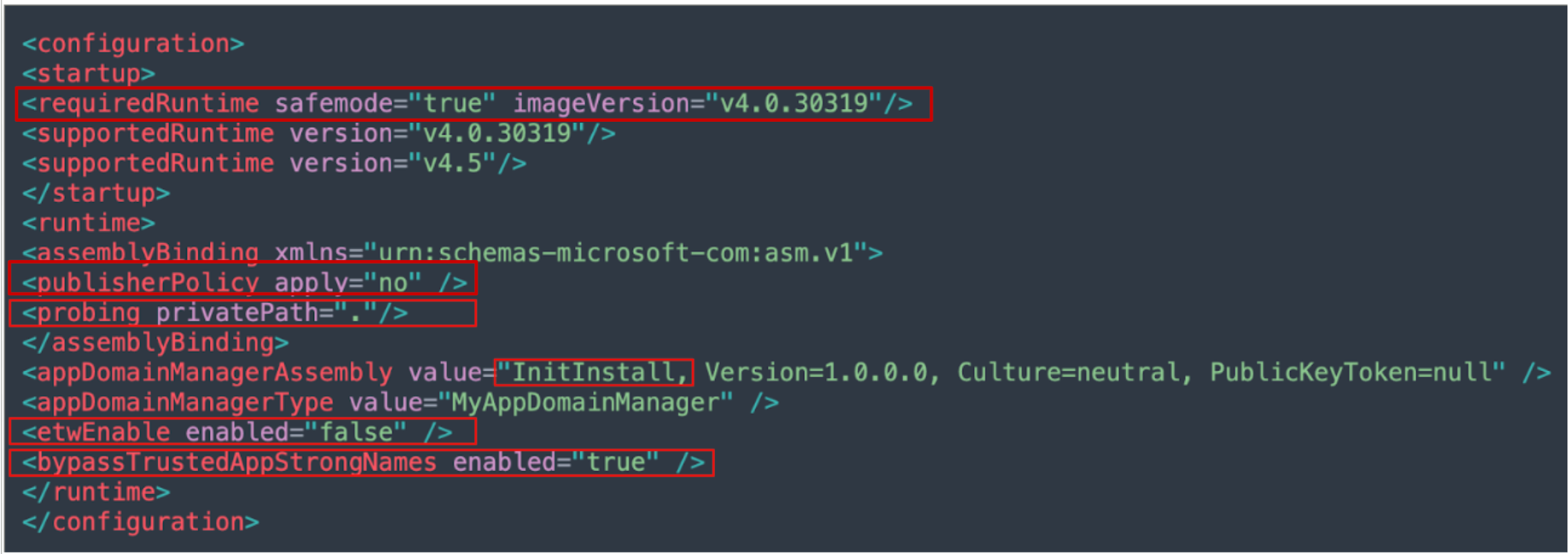
This represents a mature living-off-the-land approach to execution. Rather than writing complex shellcode to unhook security monitors or patch ETW in memory, actions that often trigger behavioral alerts, Screening Serpens asks the .NET runtime to turn off its own security mechanisms via a legitimate configuration file. Combined with the Pre-Main() execution timing, the malicious InitInstall.dll payload runs in an entirely unmonitored, highly privileged context.
Stage 1: Installation and Creating Persistence
When the advanced .config file successfully hijacks the CLR initialization, it triggers the execution of InitInstall.dll. This C# assembly acts as the primary loader and installer for the second malware family, MiniUpdate.
Before staging the final payloads, the malware unpacks its configuration. The malware's static constructor uses a custom, two-step cipher to decrypt nine key configuration strings. First, the constructor reverses the input bytes interpreted as UTF-8. Next, it applies a standard ROT13 cipher to the alphabetic characters.
Once the strings are decrypted, the loader initiates a sequence that blends user interface (UI) deception with stealthy file staging and persistence.
1. The decoy UI and lure: To disguise the malicious activity happening in the background, the loader launches a background thread that renders a borderless, transparent window. This window displays a custom circular loading spinner specifically designed to mimic a legitimate installer progress indicator. This window has no taskbar entry, making it difficult for a user to inspect or close, as Figure 8 shows.

2. Staging the MiniUpdate payload: While the fake spinner is displayed, the malware resolves its current directory and constructs a new hidden installation path under the legitimate local appdata directory of the video conferencing application’s folder.
The malware specifically adds a \bin\update folder to hold its files. If the directory does not exist, the malware creates it. The malware then copies and renames four files from the initial infection folder into this new directory:
- setup.exe is renamed to update.exe
- UpdateConfig.xml is renamed to update.exe.config
- Updater.dll is copied as is
- UpdateChecker.dll (the MiniUpdate payload) is copied as is
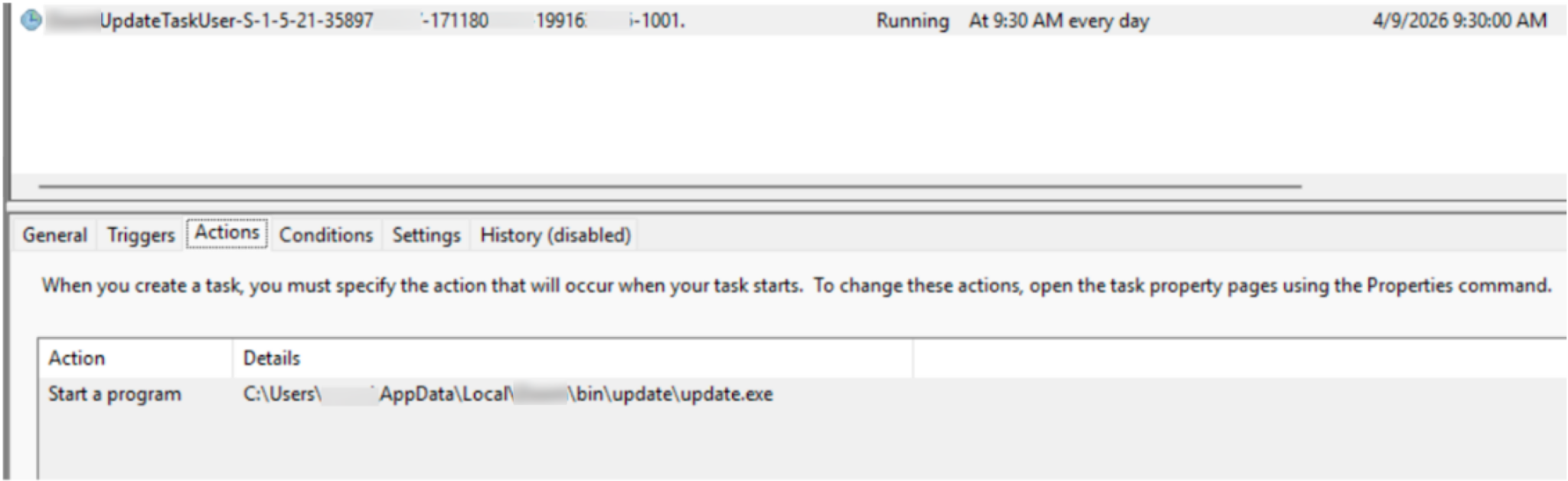
3. Establishing persistence: With the files staged, InitInstall.dll leverages Windows Task Scheduler to ensure the payload survives reboots. It creates a scheduled task that is configured to trigger every day at 09:30 local time.
Figure 9 shows the newly created scheduled task in a controlled test environment.
After a final 30-second delay, the loader forces the scheduled task to run immediately, starting the execution of Stage 2 by running update.exe.
Stage 2: Anti-Analysis Checks
When the scheduled task triggers the renamed setup binary (update.exe), the malware initiates a second AppDomainManager hijack to safely transition to the next stage. The threat actor uses the dropped update.exe.config file to reapply their native evasion directives, explicitly disabling ETW and strong name verification. This effectively hollows out the legitimate Microsoft process, allowing the next payload, Updater.dll, to load into an unmonitored memory space.
Operating entirely within this blinded environment, Updater.dll acts as a gatekeeper. Before deploying the core RAT, it ensures the malware is executing within the intended infection chain by performing two strict environmental checks:
- Process verification: The DLL verifies that the current running process is named update.exe.
- Sandbox evasion: It checks if the parent process is svchost.exe. Because the malware relies on a scheduled task to launch, svchost is the natural parent. If a security analyst or automated sandbox executes the file directly, this check will fail and the malware will silently terminate.
Once the environment is validated, the loader dynamically constructs the path to the final UpdateChecker.dll payload. It loads the module into memory and invokes the CheckForUpdates export, officially handing over control to the MiniUpdate RAT.
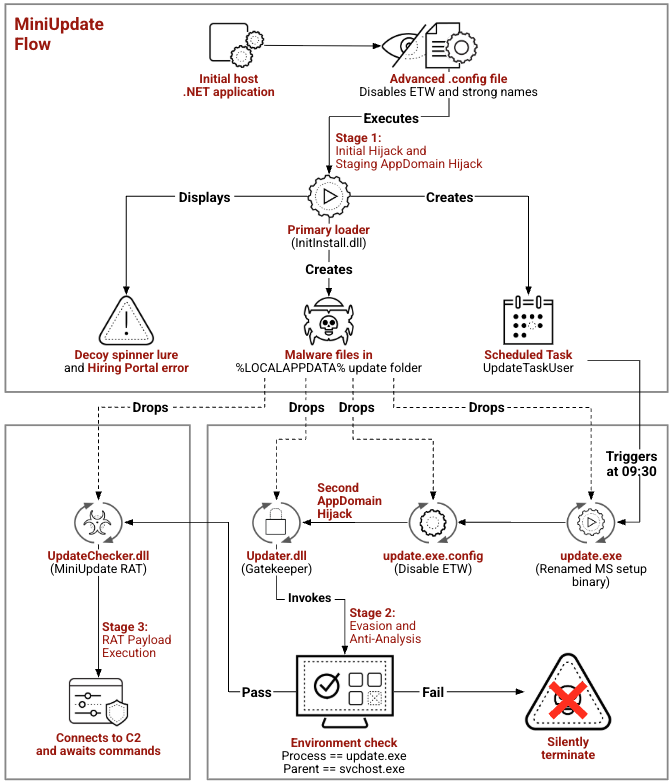
Figure 10 shows the full flow of this MiniUpdate malware.
Stage 3: Payload Execution and Core Functionality
The MiniUpdate payload operates via external C2s and a compromised digital signature. This variant is driven by a 16-opcode dispatcher, giving attackers extensive control over file operations, shell execution and process manipulation.
C2 Architecture and Network Execution
This variant is designed to cycle through three different command servers in a specific order, checking each one for instructions:
- buisness-centeral.azurewebsites[.]net
- buisness-centeral-transportation.azurewebsites[.]net
- Buisness-centeral-transportation[.]com
The following user agent is used in the communication:
Mozilla/5.0 (Windows NT 10.0; Win64; x64) AppleWebKit/537.36 (KHTML, like Gecko) Chrome/146.0.0.0 Safari/537.36
- Digital signature misuse: This payload is digitally signed under the name of a software company whose signature appears to have been stolen or impersonated.
- Operations security (OPSEC) shift (plaintext strings): MiniUpdate stores all API names, C2 domains and endpoints in plaintext within the .rdata section. This lack of string obfuscation suggests either a rushed deployment cycle or the involvement of a different development cell within the threat group. Conversely, the MiniJunk V2 samples featured heavy Mixed Boolean-Arithmetic and XOR obfuscation.
Core Capabilities
The analyzed payload functions as a highly versatile backdoor, granting the attacker near-complete operational control over the compromised host's file system, processes and environment. Command polling occurs via GET requests to the /agent/poll endpoint. The internal command dispatcher processes a Base64-decoded binary format and supports 16 distinct opcodes. Key capabilities include:
- Arbitrary command execution: Executes shell commands via cmd.exe /c
- Dynamic code execution: Loads arbitrary DLLs directly into memory to run specific exported functions
- Process manipulation: Enumerates running processes and terminates them
- Data exfiltration: Uploads files to the C2 server, including support for chunked uploads
- Privilege escalation: Requests User Account Control (UAC) elevation
- Persistence: Creates a logon-triggered scheduled task named WindowsSecurityUpdate, with built-in capabilities to remove or reinstall this task
MiniJunk V2 Analysis
We assess the second malware family identified in this campaign, MiniJunk V2, is an evolved version of the previously documented MiniJunk malware, featuring updated core functionalities. We correlate this malware family to Screening Serpens, based on the setup.exe file in the lure archive. As documented in Check Point reporting, the threat actor uses this exact legitimate binary to sideload their malicious payloads. Furthermore, we observed the same defense evasion tactics that Check Point's research outlined. Across all samples, the threat actor uses junk code and padding to artificially inflate the file size, successfully bypassing endpoint detection and scanning limits.
On Feb. 17, 2026, a MiniJunk V2 sample appearing to target an entity in the Middle East surfaced shortly before the regional conflict. Our visibility indicated another campaign on March 27, 2026, that may have targeted an entity in the U.S. one month after the conflict began. This timeline strengthens our assessment that the payload is a recently upgraded version derived from previously documented campaigns, illustrating a continuous cycle of development and deployment.
MiniJunk V2: February Middle Eastern Campaign
On Feb. 17, 2026, we identified evidence of a spear-phishing campaign targeting a professional working in the technology sector, based in a Middle Eastern country. Our analysis of the files in the malicious archive indicates that the preparation for this campaign and its malware development began in late 2025. The threat actor conducted careful reconnaissance, exploiting the target's active job-hunting footprint to engineer a customized lure. To establish legitimacy and coerce the target to execute their payload, the attackers shared a spoofed recruitment URL from a legitimate, well-known employment website.
Social Engineering and Initial Access
The threat actor initiated the attack by distributing a spoofed recruitment URL: hxxps[:]//[REDACTED][.]com/career/recreuitment/[REDACTED]. This endpoint currently returns an HTTP 404 Not Found status code, which we assess was a visual decoy intended to mislead the target.
The URL’s specific misspelling (recreuitment) indicates an intentional, fraudulent fabrication, engineered with the knowledge that the link would remain non-functional by design. Analysis shows no indication that the impersonated organization’s infrastructure, systems or domains were compromised or breached.
The group likely used this non-functional URL to prompt the target to take a work around solution into an offline portal. The target would then be redirected to a dedicated storage instance hosted within an attacker-managed ONLYOFFICE workspace. This infrastructure served as the delivery point for the primary payload, where the victim was induced to download a malicious archive disguised as legitimate recruitment materials
The attack execution advances when the victim complies with the lure instructions, manually retrieving and downloading the weaponized Portal.zip archive. This archive contains a file named Setup.exe and three hidden files. Since the default Windows settings do not reveal hidden files, a user would not normally see these three files. Figure 11 shows the contents of the archive.
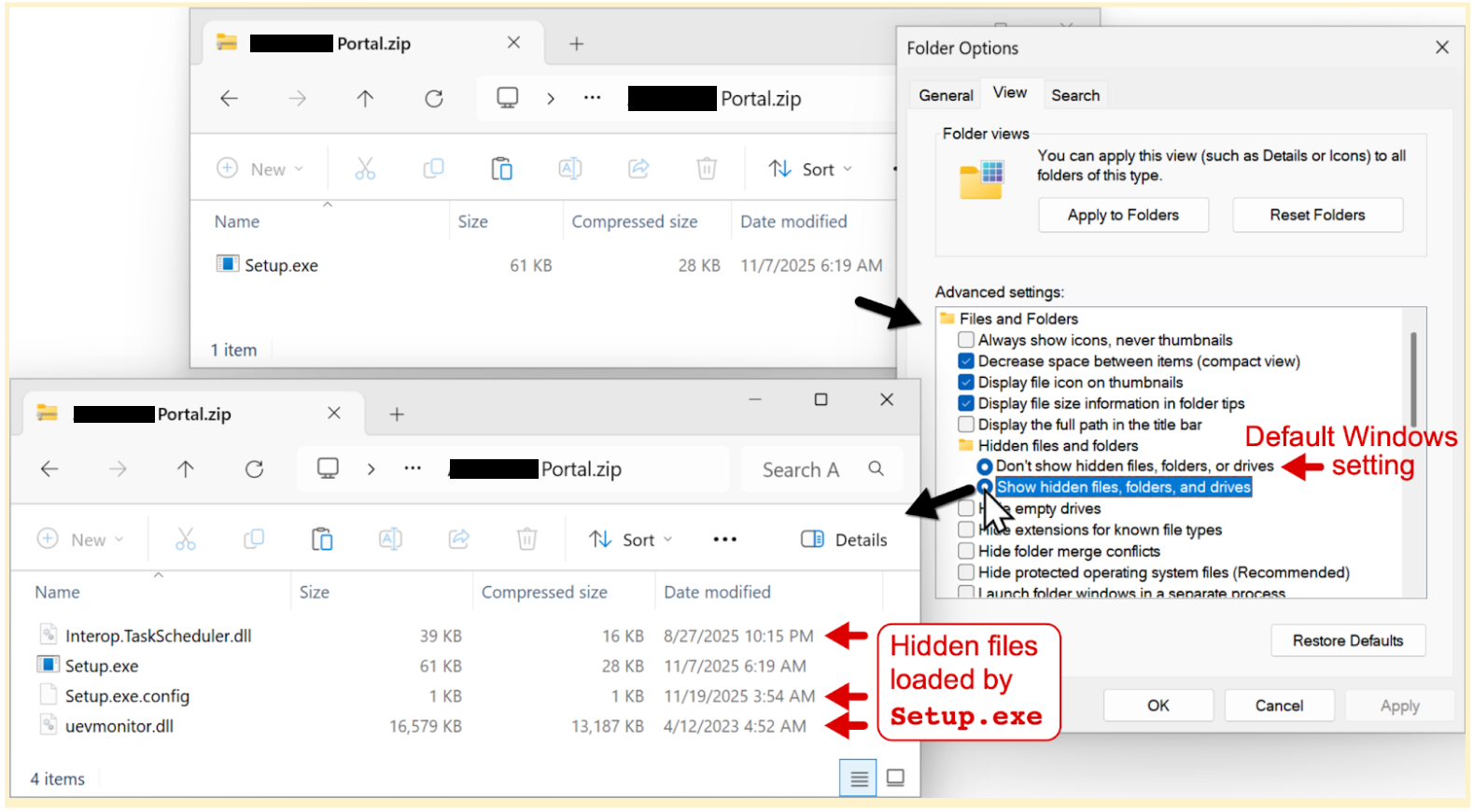
One of the hidden files is a malicious DLL named uevmonitor.dll that contains the payload for this attack. If a user runs the Setup.exe file, the action initiates an infection chain under the context of the logged-in user.
AppDomainManager: Sideloading and Hijacking
During our analysis of the MiniJunk V2 sample, we observed the threat actor using an older version of .config file to facilitate local sideloading. In this instance, the attackers authored a custom malicious DLL named uevmonitor and deployed it alongside a legitimate .NET executable. To successfully sideload their payload into the host process, they used the <probing privatePath="./"/> directive, forcing the application to prioritize its local working directory, which is a key prerequisite for DLL sideloading.
The original MiniJunk configuration lacked operational security measures such as evasion features, making it susceptible to detection. The attackers updated their newer tool, MiniUpdate, with stealthy evasion techniques. Figure 12 shows the original .config file, which was used only for sideloading the uevmonitor.dll file.

Technical Analysis of the Payload
Serving as the primary loader, the uevmonitor.dll assembly initiates the infection chain once executed by the initial, legitimate Setup.exe host process. It silently drops two embedded payloads into the local AppData directory:
- SoftwareLicencing.exe: a renamed, legitimate Microsoft setup binary
- unbcl.dll: the core malicious payload
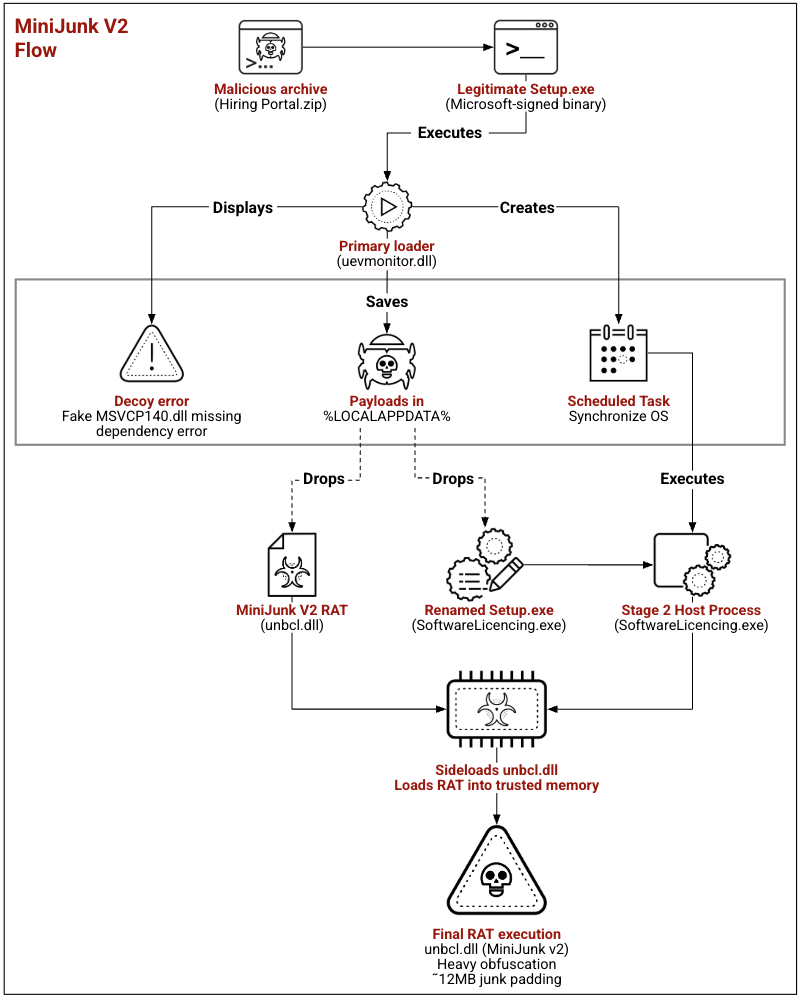
To maintain its foothold, the loader creates a scheduled task for persistence named Synchronize OS and simultaneously displays a decoy system error to the user to mask this background activity. The sequence culminates when the scheduled task triggers SoftwareLicencing.exe, which specifically sideloads the malicious unbcl.dll into its trusted memory space. This action successfully deploys the heavily obfuscated RAT, granting the attacker operational control via externally-hosted C2 infrastructure.
Figure 13 demonstrates the entire flow to deploy the malicious RAT, including AppDomainManager hijacking and two DLL sideloading instances.
C2 Loop and Network Execution
During execution, the malware dynamically decrypts data within its code to retrieve five C2 domains:
- licencemanagers.azurewebsites[.]net
- LicenceSupporting.azurewebsites[.]net
- PeerDistSvcManagers.azurewebsites[.]net
- ThemesManagers.azurewebsites[.]net
- ThemesProviderManagers.azurewebsites[.]net
These domains mimic legitimate Windows service names, attempting to blend in with network communication.
Simultaneously, the malware uses Mixed Boolean-Arithmetic decryption to construct a hard-coded User-Agent string. The resulting string mimics legitimate Microsoft Edge browser traffic:
Mozilla/5.0 (Windows NT 10.0; Win64; x64) AppleWebKit/537.36 (KHTML, like Gecko) Chrome/144.0.0.0 Safari/537.36 Edg/144.0.0.0
Behavioral analysis confirms that the malware interacts with specific API endpoints on the C2 servers. The endpoints implemented are:
- /api/app/check: The initial beacon, handling victim registration and establishing the session.
- /api/app/update: Retrieves execution commands and downloads subsequent payloads.
- /api/app/comment: Exfiltrates data and sends operational status reports to the threat actor.
The malware’s .rdata section is packed with thousands of junk strings, including Java and Python tracebacks, SQL queries and .NET exceptions. These strings repeat every 0x1E50 bytes. This repetition serves two purposes:
- Flooding string extraction tools with irrelevant data
- Inflating the binary size to around 12 MB in an attempt to bypass file-size limits on certain automated sandboxes
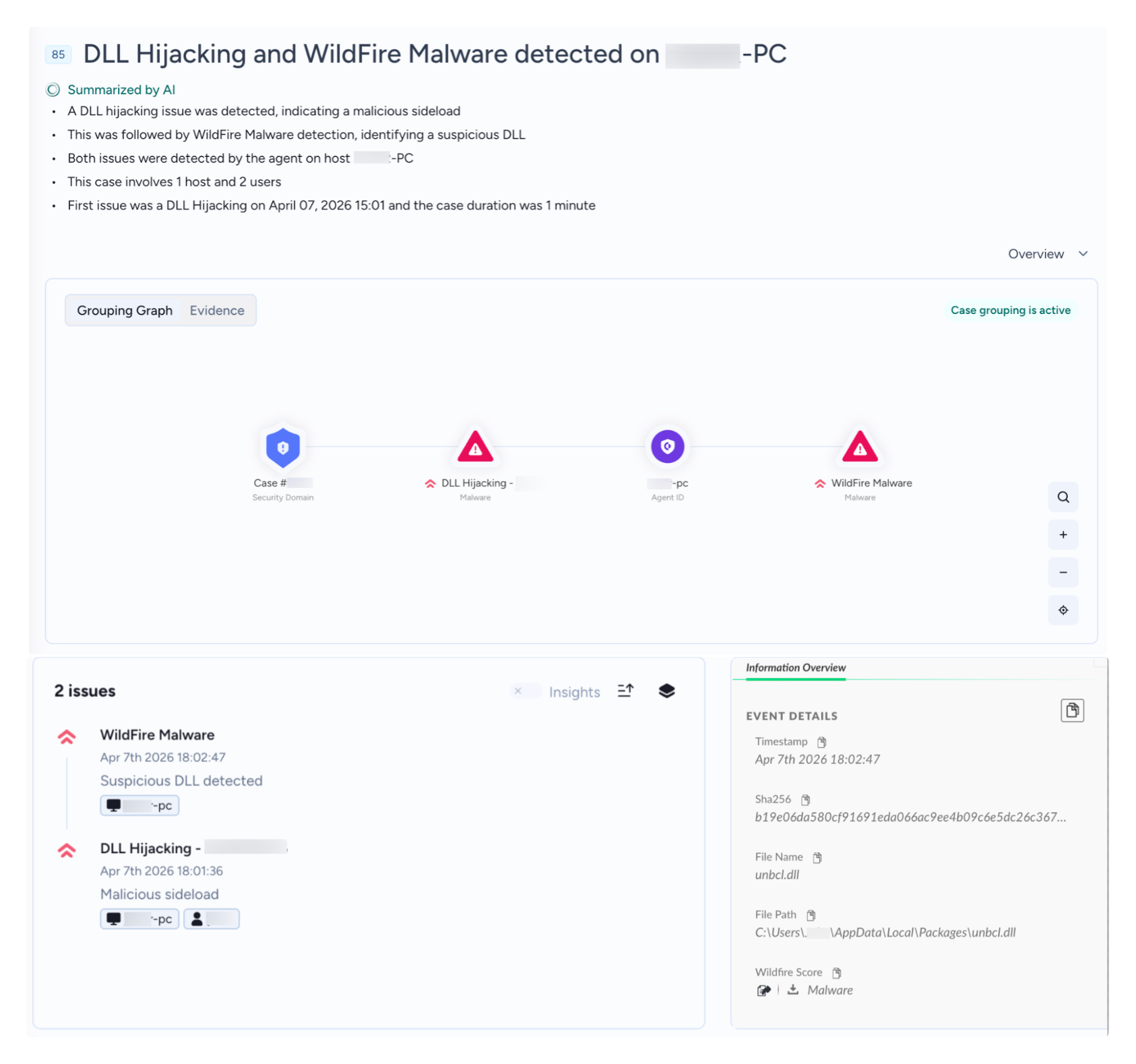
The sideloading chain and malicious executable triggered Cortex XDR to flag this threat as high risk. It also prevented the threat from executing before any user interaction could take place. Figure 14 shows this detection and prevention.
MiniJunk V2: March U.S. Campaign
While tracking the unique SoftwareLicencing.exe file, we discovered a newly developed malware variant that may have been deployed against a U.S.-based target. First submitted to VirusTotal on March 27, 2026, the malware is delivered within an archive named Portable platform.zip. This malware sample appears to have been actively developed and used during the recent regional conflict.
This latest iteration features a complex, multi-stage execution chain designed to evade detection. It relies on a social-engineering decoy graphical user interface (GUI) to deceive the target while quietly establishing a heavily obfuscated C2 connection.
Social Engineering and Initial Access
The infection begins with the Portable platform.zip lure archive, hosted on a unique ONLYOFFICE DocSpace: hxxps[:]//docspace-y4cumb.onlyoffice[.]com/storage/files/root/folder_3602000/file_3601577/v1/content.zip[...]
Figure 15 shows the archive content.
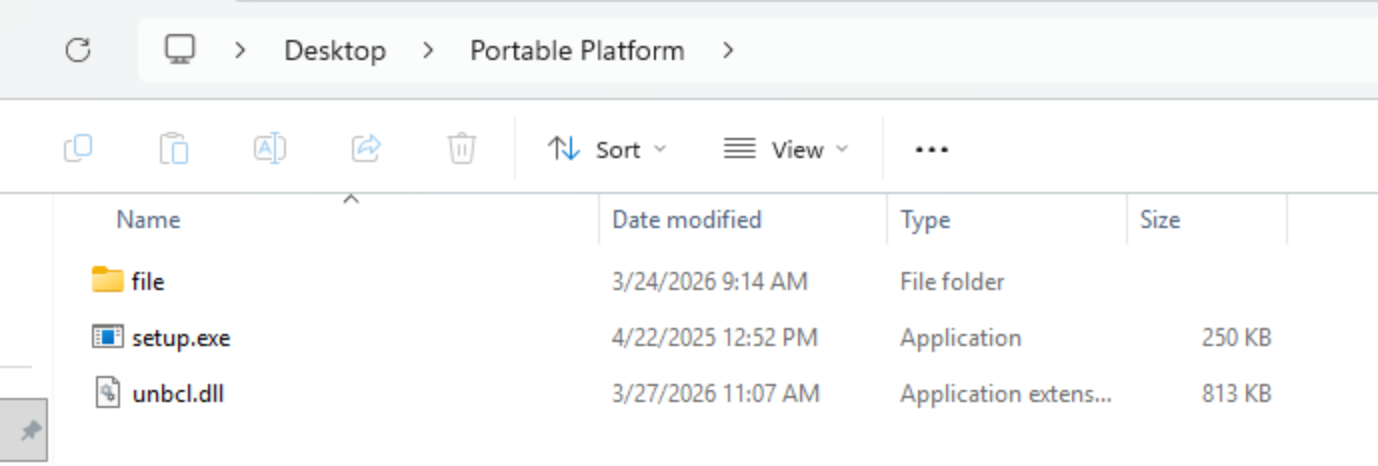
Figure 16 shows the file folder content.
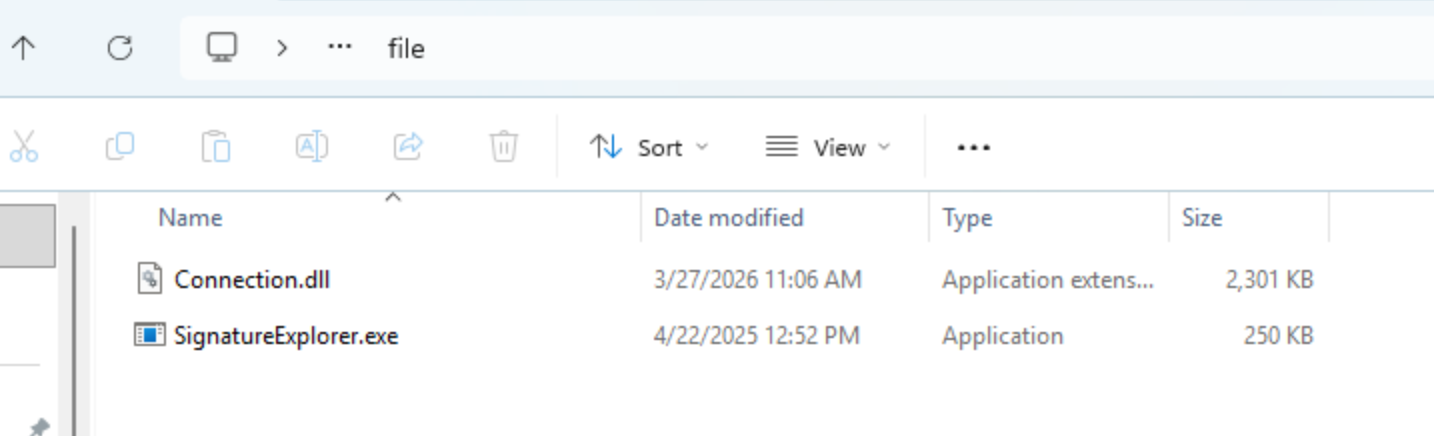
Upon extraction, the archive initiates a DLL sideloading sequence. The execution flow leverages the legitimate Setup.exe, which subsequently loads two malicious components:
- Unbcl.dll: a social-engineering decoy
- Connection.dll: the primary payload, a RAT
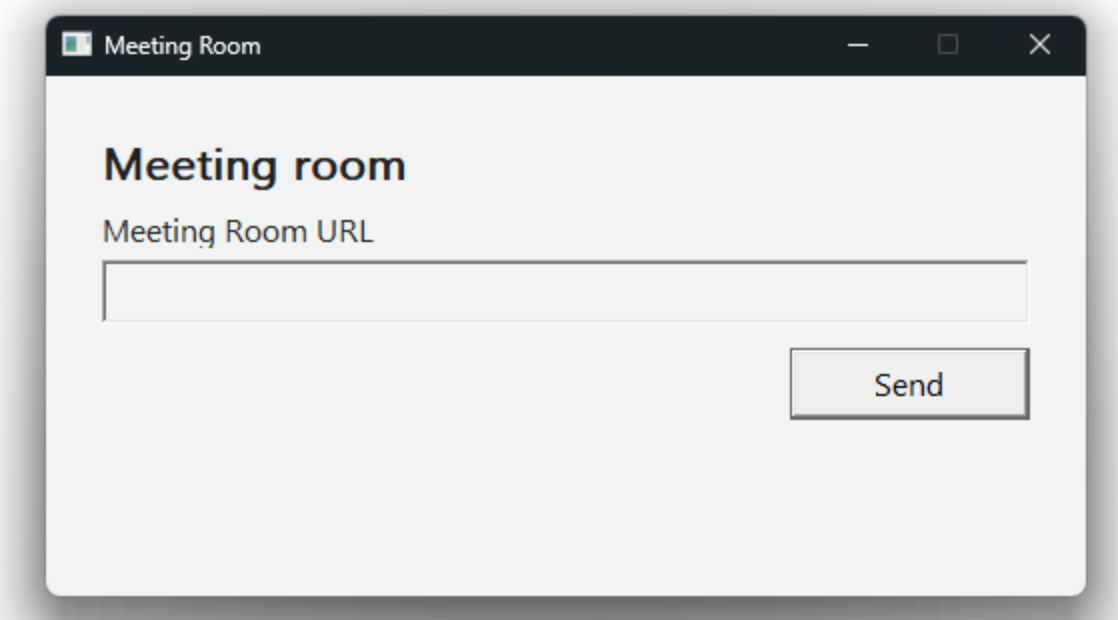
The execution of Unbcl.dll creates a background thread displaying a GUI to the target. The window is titled “Meeting Room” and prompts the victim to provide a “Meeting Room URL.” This provides a plausible reason for the execution, tricking the victim into believing they are joining a legitimate web conference while the primary C2 beacon operates silently in the background.
Figure 17 shows the decoy window.
When the Connection.dll RAT runs, it follows a strict execution sequence:
- It performs a hard-coded date-based validity check to ensure that the RAT runs on any date that is after March 27, 2026, 13:30:00 UTC. This validity check serves as an execution trigger that potentially enables the threat actor to avoid sandbox analysis, bypass initial security screenings and maintain a low profile until the predetermined operational phase begins.
- If successful, the RAT spawns the main worker thread, constructs a file path using its internal name (SystemtUpdateTaskMachine.exe) and performs an instance check to ensure it is only running once.
Technical Analysis of the Payload
The Connection.dll payload is another RAT with multiple capabilities and defense evasion mechanisms.
Once in the main loop, the malware XOR-decrypts (using a single-byte key, 0x8A) data within its code to acquire a Chrome-based User-Agent string and three URLs using Azure-hosted C2 domains. These domains impersonate global companies operating within the technology, cybersecurity and artificial intelligence sectors:
- hxxps[:]//NanoMatrix.azurewebsites[.]net
- hxxps[:]//QuantumWeave.azurewebsites[.]net
- hxxps[:]//ElementShift.azurewebsites[.]net
The malware beacons to the primary C2 base URL via an HTTP POST request. Depending on the parsed response, the malware will execute chunked uploads or downloads via specific transfer URLs or create additional threads for command execution.
Conclusion
The continuous tracking of the Iran-nexus APT group, Screening Serpens, reveals a persistent threat group that has remained active in recent months. The group has increased its operations since the regional conflict that started in February 2026, deploying two families of RAT variants across entities in up to five different countries.
A defining characteristic of these recent campaigns is the deep personalization of the attackers' lures. By leveraging tailored social engineering tactics, including fake job requisitions and spoofed video conferencing meeting invitations, the attackers lure victims into initiating the infection chain, thereby exposing their organizations to further exploitation.
We observed a significant evolution in the group’s tradecraft: For the first time, Screening Serpens has fused its standard DLL sideloading techniques with advanced AppDomainManager hijacking. By weaponizing the .NET initialization process and manipulating legitimate configuration files, the group can now preemptively bypass traditional security telemetry and execute payloads before most standard endpoint defenses are fully initialized. This tactic effectively allows attackers to establish persistence and maintain full operational control over the exfiltration of sensitive data.
Instead of relying solely on known malware indicators, defenders should ensure that EDR tools are fine-tuned to detect DLL sideloading and AppDomainManager hijacking. Treating these specific execution techniques as high risk will help organizations to identify behavioral anomalies associated with trusted, signed binaries loading untrusted modules.
As of April 2026, Screening Serpens activity shows no signs of slowing down and has continued to orchestrate sustained, adaptive global cyber campaigns. Organizations may expect further attempts in the near term and should harden their defensive posture to prepare for potential compromise attempts.
By leveraging its cutting-edge ecosystem, Palo Alto Networks customers are better protected from the threats discussed above through these industry-leading products:
- The Advanced WildFire machine-learning models and analysis techniques have been updated to protect against the indicators shared in this research. Advanced WildFire is powered by Precision AI.
- Advanced URL Filtering and Advanced DNS Security identify and block known domains and URLs associated with this activity in real time.
- Cortex XDR and XSIAM help to prevent the threats described in this article, by employing the Malware Prevention Engine. This approach combines several layers of protection, including Advanced WildFire, Behavioral Threat Protection and the Local Analysis module, to prevent both known and unknown malware from causing harm to endpoints — all in a single interface.
- Cortex Cloud customers are better protected against operations that target cloud environments through the proper placement of Cortex Cloud XDR endpoint agent and serverless agents. Screening Serpens’ use of cloud infrastructure to host command and control endpoints points to cloud architecture functionality. Cortex Cloud is designed to protect a cloud’s posture and runtime operations against the threats outlined here. It also helps detect and prevent malicious operations, configuration alterations and exploitation within cloud environments.
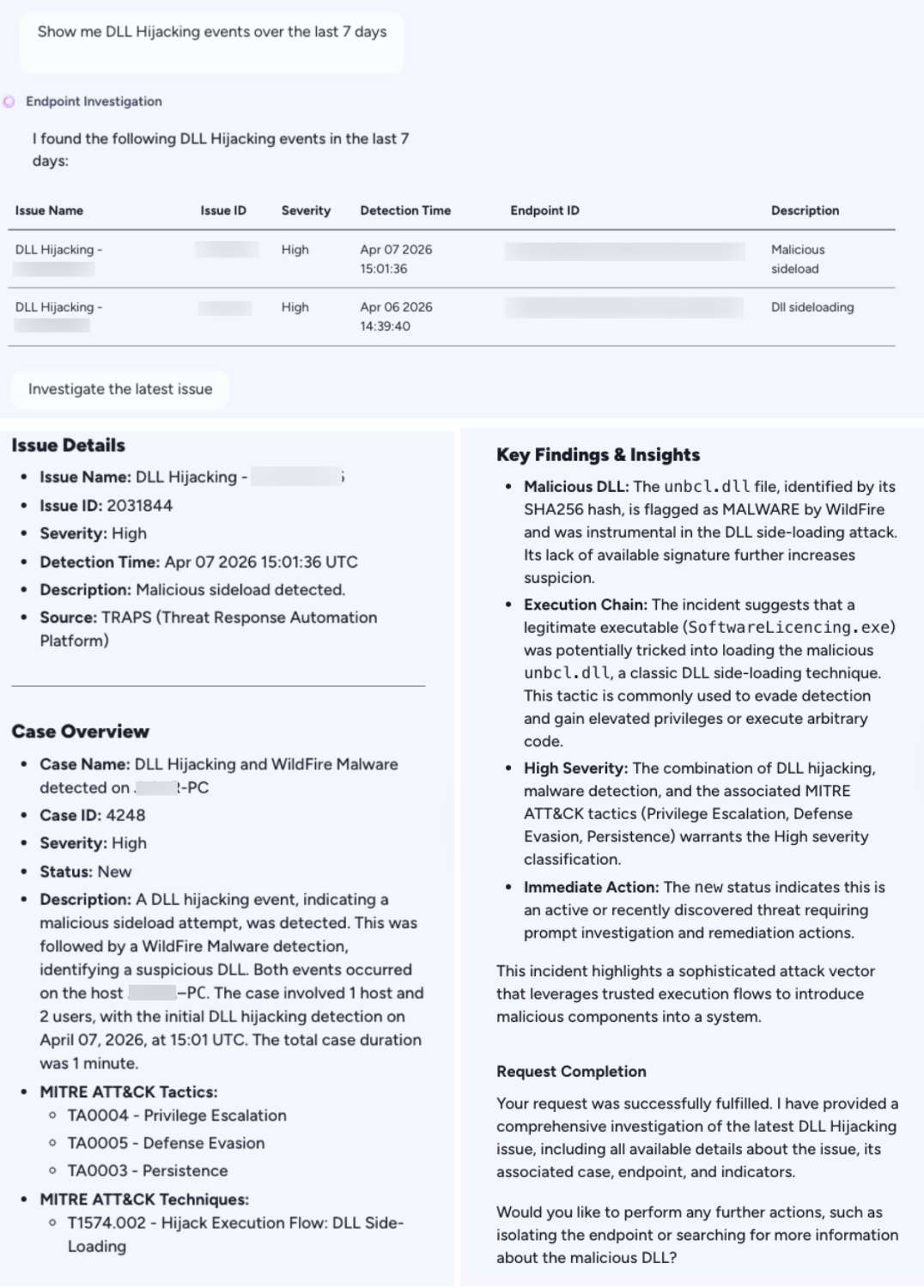
- Cortex AgentiX Agentic Assistant streamlined our investigation by enabling the team to query the data using natural language, providing deeper context and insights, and suggesting clear recommendations on what we should do next. Figure 18 shows the AgentiX interface when querying for malicious activity in a tenant.
If you think you may have been compromised or have an urgent matter, get in touch with the Unit 42 Incident Response team or call:
- North America: Toll Free: +1 (866) 486-4842 (866.4.UNIT42)
- UK: +44.20.3743.3660
- Europe and Middle East: +31.20.299.3130
- Asia: +65.6983.8730
- Japan: +81.50.1790.0200
- Australia: +61.2.4062.7950
- India: 000 800 050 45107
- South Korea: +82.080.467.8774
Palo Alto Networks has shared these findings with our fellow Cyber Threat Alliance (CTA) members. CTA members use this intelligence to rapidly deploy protections to their customers and to systematically disrupt malicious cyber actors. Learn more about the Cyber Threat Alliance.
Indicators of Compromise
Domains:
- licencemanagers.azurewebsites[.]net
- LicenceSupporting.azurewebsites[.]net
- PeerDistSvcManagers.azurewebsites[.]net
- ThemesManagers.azurewebsites[.]net
- ThemesProviderManagers.azurewebsites[.]net
- docspace-y4cumb.onlyoffice[.]com
- NanoMatrix.azurewebsites[.]net
- QuantumWeave.azurewebsites[.]net
- ElementShift.azurewebsites[.]net
- business-startup[.]org
- business-startup.azurewebsites[.]net
- Businessstartup.azurewebsites[.]net
- app[redacted][.]live
- buisness-centeral.azurewebsites[.]net
- buisness-centeral-transportation.azurewebsites[.]net
- Buisness-centeral-transportation[.]com
- docspace-twpf0e.onlyoffice[.]com
- PremierHealthAdvisory[.]com
- PremierHealthAdvisory.azurewebsites[.]net
- Premier-HealthAdvisory.azurewebsites[.]net
- Ramiltonsfinance[.]com
- Ramiltonsfinance.azurewebsites[.]neti
- Ramiltons-finance.azurewebsites[.]net
URLs:
- hxxps[:]//docspace-y4cumb.onlyoffice[.]com/storage/files/root/folder_3602000/file_3601577/v1/content.zip[...]
- hxxps[:]//app[redacted][.]live/meeting/edcdba624ddb43c2a1dcf334aa493068
- hxxps[:]//docspace-twpf0e.onlyoffice[.]com/storage/files/root/folder_3765000/file_3764519/v1/content.zip?filename=remote.[REDACTED].zip
- hxxps[:]//2117.filemail[.]com/api/file/get?filekey=T0EnWQ6NugHkW_kLfDxPBEw_um6NSkg9ZwNRQ_5lrKrLLUo35pV8m3TKv1LqF3zZzdUm
SHA256 Hashes:
MiniUpdate: US Campaign
- 44f4f7aca7f1d9bfdaf7b3736934cbe19f851a707662f8f0b0c49b383e054250 - Initial archive file
- 332ba2f0297dfb1599adecc3e9067893e7cf243aa23aedce4906a4c480574c17 - Hiring Portal.zip
- 0db36a04d304ad96f9e6f97b531934594cd95a5cea9ff2c9af249201089dc864 - UpdateChecker.dll
MiniUpdate: Israel Campaign
- 38bd137c672bd58d08c4f0502f993a6561e2c3411773d1ae57ee0151a0a9d11d - Initial archive file
- d4a7e9f107fe40c1a5d0139c6c6e25bf6bf57f61feff090bee28f476bb3cc3c2 - UpdateChecker.dll
MiniUpdate: UAE Campaign
- bc3b44154518c5794ce639108e7b9c5fecb0c189607a26de1aaed518d890c7ad - UpdateChecker.dll
MiniUpdate: Middle Eastern Campaign
- 74882085db2088356ed7f72f01e0404a0a98cda88ef56fb15ce74c1f36b26d27
- bc3b44154518c5794ce639108e7b9c5fecb0c189607a26de1aaed518d890c7ad - UpdateChecker.dll
MiniJunk V2: Middle Eastern Campaign
- 9cf029daca89523d917dafed0568d11d00e45ec96b5b90b4a1f7fd4018c7da84 - uevmonitor.dll
- B19e06da580cf91691eda066ac9ee4b09c6e5dc26c367af12660fe1f9306eec4 - unbcl.dll
MiniJunk V2: U.S. Campaign
- 8808c794c24367438f183e4be941876f1d3ecd0c8d2eb43b10d2380841d2283b - Portable Platform.zip
- 43dc62cef52ebdd69e79f10015b3e13890f26c058325c0ff139c70f8d8eadcfa - Connection.dll
- 9e4a658e6d831c9e9bdfe11884a75b7c64812ed0a80e8495ddf6b316505acac1 - unbcl.dll
Additional References
- Nimbus Manticore Deploys New Malware Targeting Europe – Check Point
- Iranian “Dream Job” Campaign – ClearSky
- Frontline Intelligence: Analysis of UNC1549 TTPs, Custom Tools, and Malware Targeting the Aerospace and Defense Ecosystem – Google Cloud Blog
- When Cats Fly: Suspected Iranian Threat Actor UNC1549 Targets Israeli and Middle East Aerospace and Defense Sectors – Google Cloud Blog
- Smoke Sandstorm: Nation-State Actors – Microsoft Security Insider
- Global Incident Response Report 2026: Screening Serpens – Unit 42 | Palo Alto Networks
Table of Contents
Related Malware Resources

 Threat Research




 Insights




 Get updates from Unit 42